Almost everyone with a computer and internet access has at least one email address, often more. How you access your email depends on the method you choose. Some people use webmail services like Yahoo Mail, Gmail, or Outlook.com, which allow you to check email through a web browser. Your messages stay on the provider’s servers, and you only need an internet connection. Others use email clients such as Microsoft Outlook, Thunderbird, or Apple Mail, which download your messages to your computer or device for offline access and additional features.
The type of email account you have determines how your messages are stored and accessed. Two common protocols are POP3 and IMAP. Understanding the differences between them helps you choose the best option for your needs.
POP3, or Post Office Protocol 3, downloads emails from the server to your local device. After downloading, messages are usually deleted from the server. This method is simple and widely supported, making it ideal for single-device use because your emails are stored locally. However, once downloaded, messages are tied to that device, so if you check email from another computer, you won’t see those messages. POP3 can also be slower for large mailboxes because it downloads entire messages. Examples of POP3 clients include Microsoft Outlook, Eudora, and Thunderbird. POP3 works best if you use one computer and want offline access without worrying about server limits.
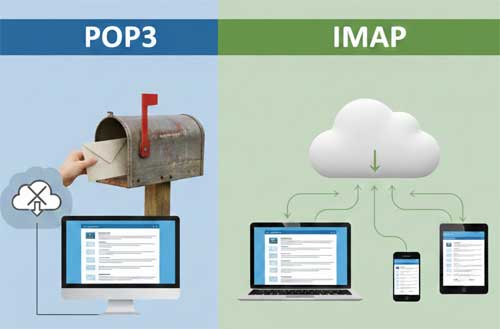
IMAP, or Internet Message Access Protocol, keeps all messages and folders on the mail server. Your email client syncs with the server, showing you the same mailbox everywhere. IMAP allows you to access your email from multiple devices such as desktops, laptops, phones, or webmail. It is faster for browsing because it only downloads message headers until you open a message. However, IMAP depends on server storage quotas, so large mailboxes may require cleanup, and it needs a stable internet connection for full functionality. IMAP is supported by clients like Outlook, Apple Mail, and Thunderbird. IMAP is best for people who travel or use multiple devices and need consistent access to all messages.
Which should you choose? POP3 is great if you use one computer and want offline access. IMAP is perfect for flexibility, letting you access your email anywhere, anytime, on any device. Your choice may depend on what your email provider supports. Most modern providers such as Gmail, Outlook.com, and Yahoo offer IMAP by default because it is more versatile.
Additional considerations include backup and security. With POP3, your emails are stored locally, so you should back up your computer. With IMAP, your provider handles storage, but exporting important messages periodically is still wise. Both protocols can use encryption like SSL or TLS, so always enable it to protect your data. Some users configure POP3 to leave a copy on the server for a set number of days, combining local storage with limited remote access.