Last Updated on September 19, 2026
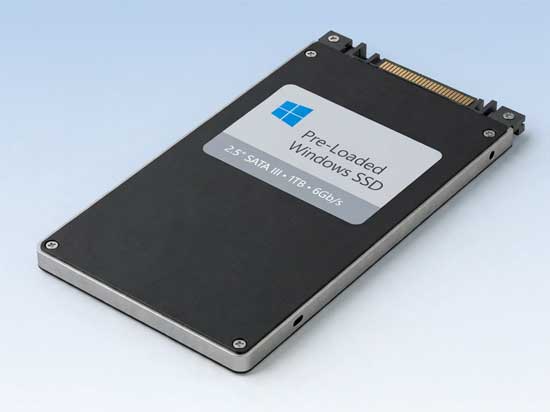
Buying a pre-loaded Windows 11 SSD sounds like the ultimate shortcut for a broken computer. You skip the entire installation process and get right back to working or gaming. Many online sellers promise a fully functioning operating system straight out of the box. You just plug the drive into your motherboard and turn on the power.
This plug-and-play approach appeals heavily to beginners who dread dealing with USB installers and partition menus. Repair shops also use these drives for incredibly fast turnaround times on customer machines. You get a brand new solid state drive and a fresh operating system simultaneously. But this massive convenience comes with several hidden risks you need to understand.
The Biggest Benefits of a Pre-Loaded Windows SSD
1. Skip the Windows Installation Process
You completely avoid downloading the massive Windows OS image from Microsoft. There is no need to create a bootable USB installer or navigate confusing partition screens. The drive simply boots up and acts exactly like a brand new PC. It is the closest thing to plug-and-play Windows you will ever find.
2. Instantly Fix Dead or Damaged Computers
Hard drives fail without warning and leave you staring at a black screen. If your old drive died or Windows refuses to boot entirely, this solution works fast. You get a fresh operating system running in just a few minutes. It rescues your hardware from the scrap heap with minimal effort.
3. Get a Hardware and Performance Upgrade
You actually receive two major upgrades in a single purchase. You get a brand new solid state drive alongside the fresh Windows installation. This hardware swap guarantees significantly faster boot times for older machines. You will notice an immediate general performance boost across all your daily tasks.
Disadvantages, Risks, and Potential Problems
1. Windows Activation May Fail to Transfer
Windows activation is strictly tied to your computer motherboard and not the storage drive. When you boot a pre-loaded drive in a completely different PC, the activation will likely fail. You might have to use your Microsoft account or enter your own product key to fix this. Reactivating requires using the hardware change troubleshooter inside the Windows settings menu.
2. You Inherit an Unknown Installation Source
You have absolutely no way to know how the seller installed the operating system. They might have used illegal methods or modified the master image with hidden scripts. The seller might not have used a genuine product key during their initial setup. This unknown origin creates a massive security blind spot for your personal data.
3. Unwanted Bloatware Often Comes Pre-Installed
Some sellers pack the drive full of unnecessary software to make it look valuable. You will frequently find trial antivirus programs or fake optimizer utilities running in the background. They also bundle free office programs and OEM software that eats up system resources. These additions clutter up a fresh system and slow down your computer.
4. Hardware Drivers Will Not Match Your PC
The seller created this Windows installation on a completely different computer system. Your specific PC will immediately need updates for the graphics card and audio chipset. The network adapters and Bluetooth modules will also require fresh driver downloads to function properly. You must connect to the internet right away to let Windows Update fix these hardware mismatches.
5. System Updates Might Be Severely Outdated
The operating system version depends entirely on when the seller made their master image. The system could be a few weeks old or occasionally outdated by a year or more. You might find yourself running the older 24H2 update instead of the current 25H2 release. Windows Update usually resolves this issue but downloading gigabytes of patches adds significant time.
How Sellers Handle Windows User Accounts
1. The Standard Out-of-Box Experience
Most reputable sellers leave Windows in the standard OOBE mode. You boot your PC and immediately see the official Windows setup screen. You choose your language, region, and connect to your local Wi-Fi network. You create your own user account from scratch just like buying a brand-new computer.
2. Pre-Configured Generic User Profiles
Some less reputable sellers cut corners and set up a generic user profile. You might see an account named User, Owner, or Administrator already sitting on the login screen. They do this to finish installing drivers or apps before shipping the drive. You inherit someone else’s profile and all the modified security settings that come with it.
3. Fixing Pre-Configured Account Issues
Booting directly into a seller-created account is a major sign of a lower-quality installation. You might not even have full administrative permissions to change system settings. You must manually add your own Microsoft account and completely delete the old generic user. Traces of their usage can still remain deep inside the Windows registry.
Cost Comparison and Shady Pricing Tactics
1. Pre-Loaded SSD vs DIY Costs
A pre-loaded SSD typically costs between $60 and $120 depending on the drive size. This price supposedly includes the Windows installation and sometimes a valid license. Buying a blank SSD yourself costs $25 to $100 based on the capacity. Adding a legitimate Microsoft retail license costs another $139 to $199 on top of the hardware.
2. Relying on Your Digital Entitlement
Many sellers keep their prices suspiciously low by relying on your existing hardware. They install Windows using your PC’s built-in digital entitlement. If your motherboard already had a digital license, Windows simply activates itself automatically. The SSD seller provides absolutely no license while taking credit for a fully activated system.
3. Using Illegal KMS Activation Tools
Some sellers use a KMS activation tool to simulate a corporate server. This method violates Microsoft licensing terms and is completely temporary. The operating system will eventually deactivate itself without warning later down the line. Antivirus software routinely flags these KMS emulators as dangerous malware threats.
4. Leaked Corporate Keys and Missing Activation
Shady listings often use leaked or abused MAK corporate keys to bypass Microsoft checks. The organization eventually notices the abuse and revokes those keys permanently. Other listings quietly state that Windows is installed but activation is still required. Customers frequently miss that fine print and end up with a restricted operating system.
Common Drive Formats and Final Verdict
1. Standard SSD Types and Partitions
These drives come in 2.5-inch SATA, M.2 SATA, and the lightning-fast M.2 NVMe formats. Most sellers format them using the modern GPT partition style and UEFI boot mode. The layout includes the standard EFI System Partition, Microsoft Reserved Partition, and the primary C drive. Older systems requiring the legacy MBR format are extremely rare today.
2. Are They Actually Worth Buying?
Pre-loaded drives offer a fast and convenient solution if you are repairing a broken PC. They provide a beginner-friendly upgrade if you need Windows running immediately and accept the activation risks. The lack of guaranteed activation and unknown installation sources pose major security threats. You should install Windows yourself using the official Media Creation Tool or Rufus for complete reliability.
For additional training resources, check out our online IT training courses.
Check out our extensive IT book series.