If you’ve ever watched a long YouTube video and wished you could skip straight to the part you care about, you already understand why chapters matter. YouTube chapters break your video into clickable segments, making it easier for viewers to navigate and find what they need. But beyond convenience, chapters can significantly improve engagement, watch time, and even SEO, all of which lead to more views. In this article, we’ll explore why chapters to YouTube videos boost views.
What Are YouTube Chapters?
YouTube chapters are timestamps added to your video description (or automatically generated by YouTube) that divide your content into sections (Just like in a book). When properly formatted, these chapters appear as clickable links in the description as seen in the image below. You can then simply click on any timestamp link to be taken directly to that chapter in the video.
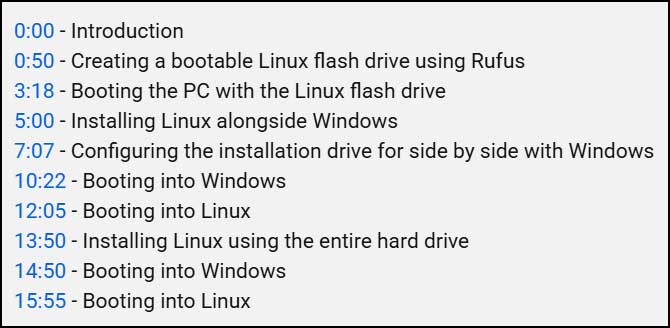
They can also be seen as visual markers on the video’s progress bar where you can click on them to skip between chapters.

You will also see them below the video description itself.
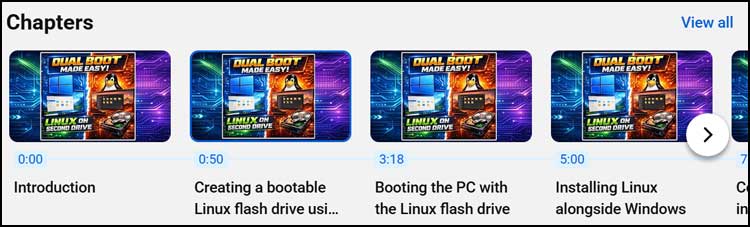
Why Chapters Boost Views
Improved Viewer Experience
Long videos can feel overwhelming. Chapters let viewers jump directly to the section they want, reducing frustration and increasing satisfaction. A positive experience means viewers are more likely to stay longer, subscribe, and return for future content.
Higher Watch Time
Watch time is one of YouTube’s most important ranking factors. When viewers can easily find relevant sections, they’re less likely to abandon the video early. Even if they skip around, they’re still engaging with your content longer than they would without chapters.
Better SEO and Discoverability
Chapter titles act as metadata. Google indexes these timestamps, and they often appear as featured snippets in search results. This creates multiple entry points for your video such as someone searching for “How to add chapters in YouTube” might land directly on your video’s relevant section.
Algorithm Signals
YouTube’s algorithm uses chapters to understand your video’s structure and topics. Well-optimized chapters help YouTube recommend your video to the right audience, boosting impressions and clicks.
Manual vs. Automatic Chapters
YouTube can auto-generate chapters, but manual chapters give you full control over:
- Keyword optimization for SEO.
- Branding and clarity in chapter titles.
- Strategic placement for viewer engagement.
Manual chapters are always the better choice if you want maximum impact.
How to Add Chapters
Adding chapters is simple:
- Go to your video description.
- Start with 00:00 for the first chapter.
- Add at least three chapters, each 10+ seconds long.
- Use clear, descriptive titles for each section.
- Make sure each chapter/timestamp starts at the correct time in the video
Example:
- 00:00 Intro
- 01:10 Why Chapters Boost Views
- 03:45 How to Add Chapters
- 06:30 SEO Tips for Chapters
Optimizing Chapters for SEO
Here’s how to make your chapters work harder for you:
- Use keywords naturally in chapter titles (e.g., “How to Add Chapters to YouTube Videos” instead of “Adding Chapters”).
- Keep titles short and clear and avoid fluff.
- Align chapters with search intent. Think about what viewers might type into Google or YouTube.
- Place chapters in the description, but keep your main SEO description at the top.
Best Practices
- Include chapters in every video longer than 3–4 minutes.
- Make chapters logical and helpful, not just random timestamps.
- Avoid keyword stuffing and focus on clarity and relevance.
- Update chapters if you edit or re-upload the video.
Do Chapters Really Increase Views?
Yes. Studies and creator reports show videos with chapters often see:
- 20–30% higher average view duration.
- Lower drop-off rates.
- Better ranking in search results thanks to indexed timestamps.
When combined with strong titles, thumbnails, and descriptions, chapters can be a game-changer for your channel.
Conclusion
Adding chapters to your YouTube videos is a simple, free strategy that improves user experience, boosts engagement, and enhances SEO. Whether you’re creating tutorials, reviews, or long-form content, chapters help your audience and help you grow.
Check out our article on how to use playlists, watch later lists and queued videos in YouTube.
For additional training resources, check out our online IT training courses.
Check out our extensive IT book series.