In the world of networking, accurate information is key to having successful communication between devices. If your data doesn’t know where to go it will simply go nowhere or get dropped by a device on the network. This is why identifiers such as IP addresses, MAC addresses and port numbers are so important.
In modern networks that handle massive amounts of real‑time traffic, these identifiers act like a precise addressing system that ensures data reaches the correct destination efficiently. Without this structured identification, even high‑speed networks would experience bottlenecks, transmission errors, and failed connections. Understanding how these identifiers work together is essential for network administrators, IT professionals, and anyone studying computer networking fundamentals.
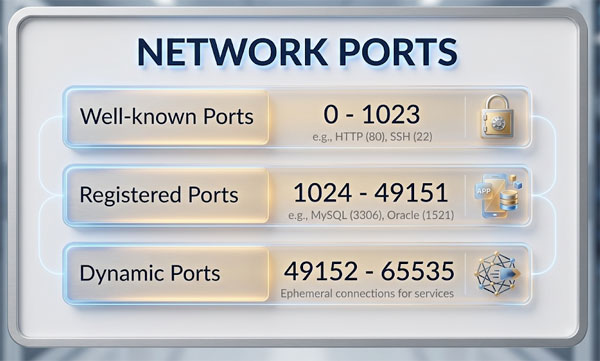
In this article we will be discussing network ports, how they function and some of the more commonly used port numbers. A port is a 16 bit number that is used to identify what service or process the information in the data packet should be used with at its destination. By using a port number, several computers can use the same application on a server without the data getting mixed up or sent to the wrong place. Port numbers are either assigned by the operating system as needed or are configured manually to work with specific applications or services. They are mainly used in TCP and UDP networks and have an available range of 65,535 possible numbers to use. Ports 0 to 1023 are considered well known ports. Ports 1024 to 49151 are registered ports used by software developers to use with their specific application. Ports 49152 to 65535 are ports available to be used by the public.
From a practical standpoint, network ports function much like dedicated communication channels that allow multiple services to operate simultaneously on the same device. For example, a single server can host web services, email services, and file transfers at the same time because each service listens on a different port number. This design increases efficiency, scalability, and security by allowing traffic to be filtered, monitored, or restricted based on port usage. Firewalls and intrusion detection systems often rely heavily on port numbers to control and analyze network traffic.
Many commonly used programs are assigned their own specific port numbers to assure reliable communication and ease of configuration since there is a standard number or numbers to use. Here is a listing of some of the most commonly use applications or services and their assigned port numbers.
| Port Number | Protocol | Description |
| 20 & 21 | FTP (File Transfer Protocol) | Used to transfer files between computers over the network or the Internet. |
| 22 | SSH (Secure Shell) | A secure method to access devices via a command line over the network or Internet. |
| 23 | Telnet | Similar to SSH but not secure. |
| 25 | SMTP (Simple Mail Transfer Protocol) | Used to send email from a mail server to a user’s mailbox. |
| 53 | DNS (Domain Name System) | Translates names to IP addresses on networks and the Internet. |
| 67 & 68 | DHCP (Dynamic Host Configuration Protocol) | Used to assign IP addresses to DHCP enabled devices so they can communicate on the network. |
| 69 | TFTP (Trivial File Transfer Protocol) | An unsecure version of FTP. |
| 80 | HTTP (Hypertext Transfer Protocol) | The protocol used to access web pages on the Internet. |
| 110 | POP3 (Post Office Protocol version 3) | One of the older protocols used to retrieve email from email servers. |
| 119 | NNTP (Network News Transport Protocol) | Used for transporting Usenet news articles to NNTP clients. |
| 123 | NTP (Network Time Protocol) | Keeps devices on the network synchronized in regards to their time. |
| 143 | IMAP4 (Internet Message Access Protocol) | A more robust protocol used to retrieve email from email servers. |
| 161 & 162 | SNMP (Simple Network Management Protocol) | Provides the ability for administrators to monitor and configure SNMP enabled devices remotely. |
| 389 | LDAP (Lightweight Directory Access Protocol) | Allows for access distributed directory information. |
| 443 | HTTPS (Secure Hypertext Transfer Protocol) | Provides a secure connection to websites using SSL or TLS. |
| 993 | IMAP4 over SSL | Allows for the use of IMAP4 over secure connections. |
| 995 | POP3 over SSL | Allows for the use of POP3 over secure connections. |
| 3389 | RDP (Remote Desktop Protocol) | Used by Windows Terminal Server for remote desktop connections. |
Using standardized port numbers also simplifies troubleshooting and network configuration. When a known service fails to connect, administrators can quickly verify whether the correct port is open, blocked, or misconfigured. This standardization is especially important in enterprise environments, cloud networking, and cybersecurity planning, where consistent port usage helps reduce errors and improves interoperability between devices, operating systems, and applications across different networks.