IP addresses are used on networks and on the Internet to allow computers to communicate with each other. If you don’t have an IP address on a TCP/IP based network then you won’t be able to talk to other computers or other networked devices which also means you wont be able to get on the Internet.
Every device connected to the Internet relies on a unique IP address for identification, routing, and data delivery. Whether you are browsing websites, sending email, streaming media, or accessing cloud‑based services, your IP address plays a critical role in how information is sent and received across the global Internet infrastructure.
IP addresses can be either static or dynamic, and they are typically assigned by Internet Service Providers (ISPs) or local network equipment such as routers and modems. Dynamic IP addressing is commonly used on the Internet to improve efficiency, simplify network administration, and support large numbers of connected devices.
There may come a time when you are setting up your network that you may need to release and renew your IP address in order to obtain a new one from your DHCP enabled device. For example if you just installed a DSL/Cable router and use DHCP from the router to get an IP Address you may need to release the IP address from your internet provider to obtain a new one from your router. Or if you are getting a duplicate IP address error message you can renew your IP address to see if you can obtain a different one.
Understanding how IP address renewal works can help resolve common Internet connection problems, improve network reliability, and restore access to online services. Releasing and renewing an IP address forces your device to request updated network configuration details, which can often correct connectivity errors and communication conflicts.
Proper IP management is an important part of maintaining Internet performance, network security, and stable access to websites and online applications. From home networks to business environments, correct IP configuration helps ensure uninterrupted connectivity and efficient data transfer across the Internet.
To perform this process you will need to open a command prompt
1. Click on Start.
2. Then type in cmd in the search box and press enter or click the cmd icon that comes up in the search.
3. Type ipconfig /release at the prompt and it will release (remove) the IP address from your network adapter.
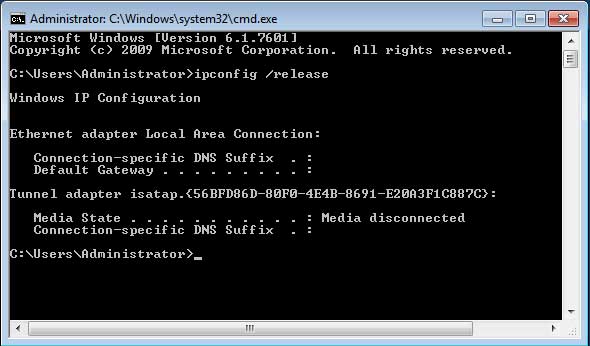
4. It should show no IP address information after the command completes.
5. Then to renew the IP address simply type in ipconfig /renew and it should show your new IP address.
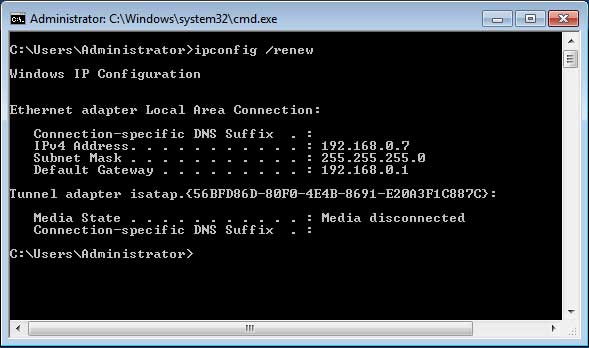
You may find that you get the same IP address if you are using the same DHCP device as you were before because of the way DHCP leases work. If its a different DHCP device then you should have a different IP address than before.