Last Updated on September 8, 2026
We have all dealt with the annoyance of internet age gates blocking our content. Usually, it is a drop-down menu where you furiously scroll back to your birth year. Sometimes it is an intrusive demand for a credit card just to prove you are an adult. With lawmakers in California, the UK, and the EU aggressively pushing new child safety regulations, the internet is scrambling. Tech companies must figure out how to verify ages without hoovering up everyone’s exact date of birth.
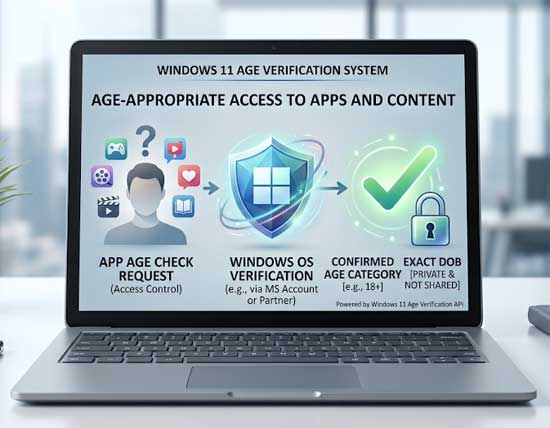
Microsoft stepped in with a massive system update in 2026. Windows 11 rolled out a major under-the-hood change called the Windows Age APIs. On paper, the pitch sounds like a perfect compromise for nervous consumers. Instead of handing over your exact birthday to every random game or social app you install, Windows acts as the middleman. The app pings the operating system directly. Windows simply replies with an age bracket like “13-15” or “18+” and a status confirming if that age has been independently verified.
The Appeal for Digital Parenting
1. Eliminate Manual Controls
For parents, it is extremely easy to see the appeal of this technology. Anyone raising kids in the digital age might view this feature as an absolute godsend. Historically, keeping your children safe online meant manually configuring parental controls on dozens of individual apps. You constantly worried that your 12 year old simply clicked “I am 18 or older” to bypass a warning screen on a newly installed game.
2. Automate the Guardrails
The Windows Age APIs completely automate this massive headache. A newly downloaded app checks with the operating system and sees the “Under 13” bracket instantly. The software immediately restricts mature content or disables in-app purchases without any human input. Parents get genuine peace of mind knowing that the guardrails are enforced at the system level. Kids cannot just lie to a web form to get around the strict rules. It centralizes digital parenting in a way that actually makes sense and takes the heavy burden off the family.
The Massive Privacy Trap for Power Users
1. The Death of Local Accounts
Long-time Windows power users should hear major alarm bells ringing right now. When you look past the family-friendly PR, this system quietly accelerates the most frustrating trend in modern computing. It signals the absolute death of local PC ownership and the forced centralization of your digital identity.
2. Forced Microsoft Account Integration
We need to ask how Windows actually knows your exact age. The new APIs do not just magically guess how old you are. They pull this data directly from a signed-in online profile. Microsoft relentlessly pushes users away from traditional offline local accounts. They use aggressive UI tactics to force people into cloud-connected Microsoft Accounts.
3. Breaking Offline Software
The Windows Age API is the ultimate weapon for this forced cloud marriage. Third-party software will start relying on the operating system to verify age for strict legal compliance. This makes a local account effectively useless for daily tasks. Without an online account feeding the API, you will find yourself locked out of games, media, or productivity apps right on your own desktop.
The Biometric Verification Nightmare
1. Outsourcing Facial Scans
Then there is the glaring issue of how your age actually gets verified by the system. Microsoft boasts that individual developers will not get your exact birthday. Getting that verified checkmark requires you to submit to invasive facial age estimation. You must upload a selfie to third-party data partners like Yoti or VerifyMy.
2. Demanding Government IDs
If the selfie scan fails, the system demands even more sensitive information. You must log into a government portal or upload a physical government-issued ID document. You trade the risk of a small developer leaking your data for absolute certainty. One of the largest tech monopolies on the planet is now cataloging your verified identity and biometric data.
3. The Ultimate Digital Gatekeeper
Historically, Windows operated as a completely neutral platform. You bought the hardware, installed the OS, and ran whatever software you chose. By moving age verification to the operating system level, Microsoft installs itself as the ultimate digital gatekeeper.
System Glitches and Loss of Ownership
1. Automated Lockouts
You must consider what happens when the automated system inevitably glitches. You might be a grown adult, but Microsoft’s automated systems or third-party selfie-scanners flag your account as “Unverified” anyway. Suddenly, a core API in your operating system broadcasts to your own software that you are not allowed to use it.
2. The Customer Support Loop
You will find yourself completely locked out of your own game library or web tools. You become trapped in an endless loop of customer support tickets. You have to prove to your own computer that you are an adult. This creates a nightmare scenario for legitimate software owners.
3. Losing Control of Your Hardware
Nobody wants children exposed to the toxic underbelly of the internet. Using child safety as a convenient excuse to build an inescapable biometric identity system directly into a desktop operating system goes way too far. By making Windows 11 the unavoidable middleman for basic software functionality, Microsoft ensures you never truly own your PC experience again. You just log in, scan your face, and hope the algorithm gives you permission to launch your own apps.