Most software comes with defaults for things such as fonts, page layout, save location and so on. If it’s quality software then it will let you change these defaults so you can customize the software to your liking. Microsoft Office programs such as Word tend to use rather boring fonts as their defaults but fortunately this can be changed so you don’t have to do it manually each time you create a document.
Default settings are designed to work for the widest range of users, but they don’t always reflect individual preferences or writing styles. When you’re creating documents frequently, small choices like font type and size can have a noticeable impact on readability, comfort, and overall appearance. Repeating the same formatting adjustments over and over can slow you down and interrupt your creative flow, which is why taking a few minutes to tailor these defaults can make everyday work feel smoother and more efficient from the very start of each document.
Default settings are designed to work for the widest range of users, but they don’t always reflect individual preferences or writing styles. When you’re creating documents frequently, small choices like font type and size can have a noticeable impact on readability, comfort, and overall appearance. Repeating the same formatting adjustments over and over can slow you down and interrupt your creative flow, which is why taking a few minutes to tailor these defaults can make everyday work feel smoother and more efficient from the very start of each document.
If you have a certain font you like to use for all your Word documents there is a way to make Word use that font by default every time you start a new document. Just follow these easy steps to change your default font.
- Open Microsoft Word
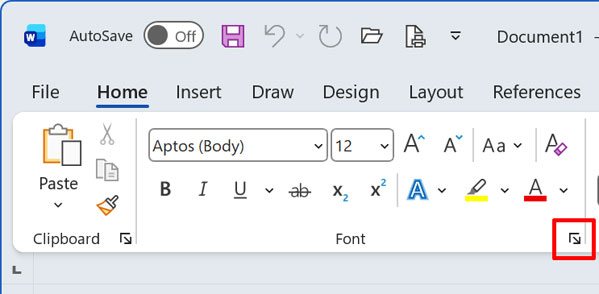
- Click the Format menu (On the Home tab, click the Font Dialog Box Launcher)
- Select the font, style, and color you would like to use as the default
- Click the Default button
- Confirm by clicking on Yes
- Click Ok
Font Dialog Box Launcher
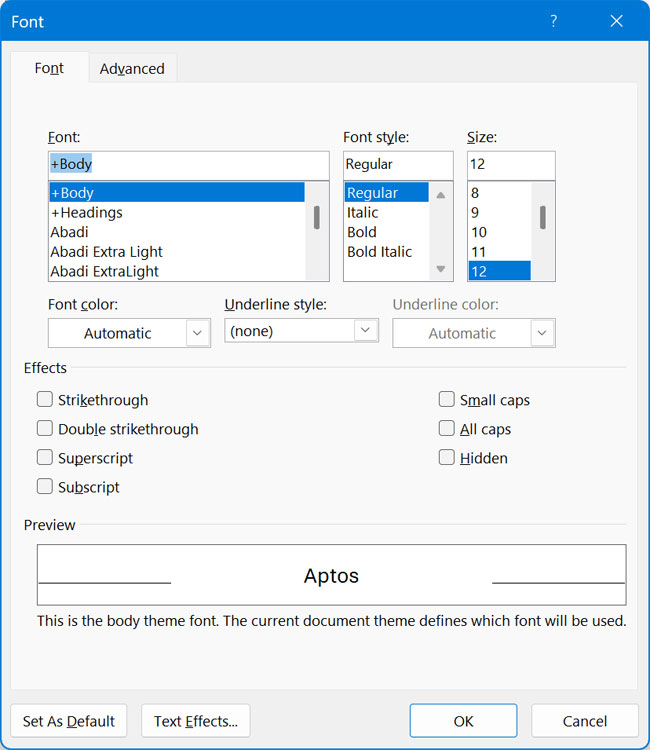
Now when you create a new Word document it will use your preferred font that you set as the default font so you won’t have to change it each time.
Taking control of default settings in Word is a simple change that can have a lasting impact on how efficiently you work. By setting a preferred font once, you remove an unnecessary step from every new document you create, allowing you to focus immediately on content instead of formatting. This small adjustment adds up over time, creating a smoother writing experience and ensuring consistency across your documents without extra effort. Once the default is set, Word works the way you expect it to, every time you start fresh.