
Two of the most common document formats in use these days are Microsoft Word documents and Adobe PDF (Portable Document Format) files with Google Docs files near the top as well. In… Read More
If you have ever right clicked on a program icon or shortcut in the Windows taskbar, you might have noticed that you will see a listing of your recently opened files or… Read More

These days, most people use wireless (Wi-Fi) for their internet connections on their computers at home and maybe even at the office. Now that most computers have built in wireless capabilities, its… Read More
For those who still use desktop scanners to scan their documents to a digital format, you might run into the problem where you cannot edit or copy the text from your scanned… Read More
The Windows Local Security Policy Editor is a management tool that allows users to configure and control security settings on a local computer. It is similar to the Group Policy Editor tool… Read More
Depending on who you ask, Windows 11 is a vast improvement over Windows 10, but there are still many ways that Windows 11 still fails to compare to Windows 10 in terms… Read More
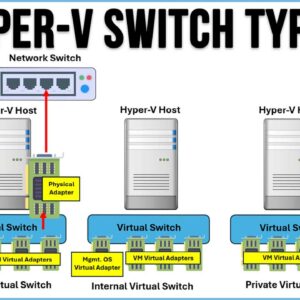
Hyper-V is Microsoft’s virtualization platform where you can create multiple virtual machines on one physical host computer. This comes in handy for management purposes as well as keeping costs down because you… Read More

Now that everyone has a video camera on them 24×7, it makes sense that many of us would want to create our own personal movies by editing the video we take with… Read More
Summary: Are you trying to import OLM to Gmail? Then, you’ve landed at the right place. Here, you will find appropriate solutions that help you transfer your OLM files to a Gmail… Read More

One of the main benefits of using a GUI (Graphical User Interface) on your computer is that you can use your mouse to click on things as well as drag and drop… Read More