Microsoft word allows you to place clipart and photographs into your documents to add extra touches to your document or to help get your point across. Images placed into Word documents are usually treated like text when it comes how they are placed in the document.
You may have noticed that when you insert a picture into Microsoft Word that it stays in line with the text and you can’t drag it to where you want it to be. Then as you edit your text, the image will move along with it which can place it in a location where you do not want it to be. This is fine if you want the picture to act like text and move around with the text in your document but if you want to move the picture around freely then this is easy to change.
By adjusting how an image interacts with surrounding text, you gain far more control over the layout and overall appearance of your document. Word offers several wrapping styles that determine whether text flows around an image, overlaps it, or ignores it entirely, and choosing the right option can dramatically improve readability and design. Understanding these layout behaviors is especially useful when working with newsletters, reports, or visually rich documents where precise image placement helps guide the reader’s attention instead of disrupting the text flow.

To do this you need to change the text wrapping layout of the picture to either behind the text or in front of the text. This option can be changed in the Layout options for images within Word. Once you have the picture inserted into your document simply click on the image to highlight it and then you can change the text wrapping options. You can also right click the image to choose an option or select Wrap Text > More Layout Options.
You can also go to the Picture Format tab in the ribbon and click on the drop down arrow under Position and then click on More Layout Options. Then go to the Text Wrapping tab and choose either Behind text or In front of text. If you choose behind text then your image will be positioned behind the text allowing the text to display over the image. If you choose in front of text then the image will cover the text and you wont be able to see it.
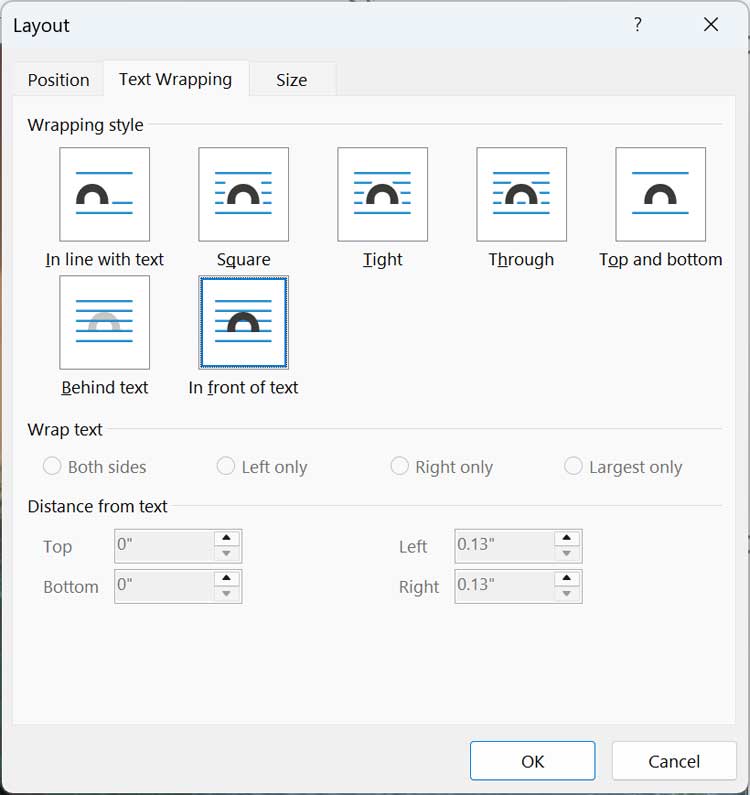
Now you will be able to drag your picture wherever you want it to be without affecting the positioning of the text in your document. You can also resize it as well as copy and paste the image into the same document or a different document.
For additional training resources, check out our online IT training courses.
Check out our extensive IT book series.