Last Updated on July 26, 2026
What is DNS?
The DNS, or Domain Name System, is a fundamental part of the internet. Without it, none of us would be able to access the internet, send emails or connect to other devices across the web.
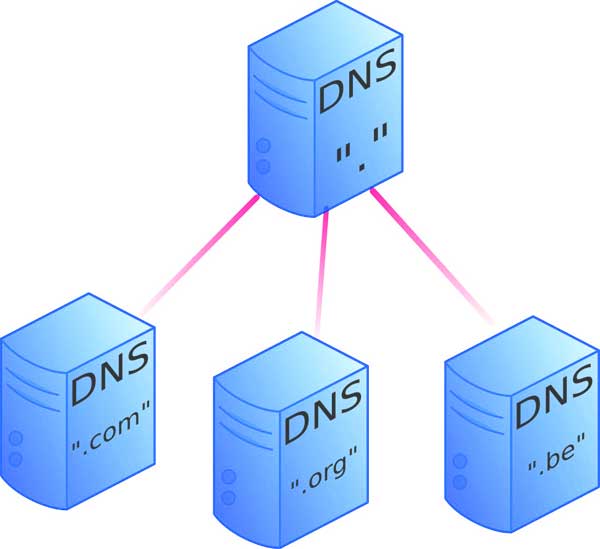
The DNS is continually working behind the scenes to convert human-friendly website names into computer-readable Internet Protocol (IP) addresses, and works by searching a system of linked DNS servers around the world. The different servers you use can have a huge impact on the stability, speed and security of your connection.
There are two different types of DNS that you can choose from: public DNS and the DNS assigned by your Internet Service Provider (ISP). Both have their own pros and cons, so we’re going to examine these to help you better understand which one you may want to use.
Understanding ISP-Assigned DNS Servers
1. The Default Configuration
Every time you connect to the internet, your ISP assigns a DNS server for you to use automatically via DHCP. This is normal, but the server assigned by your ISP isn’t always your best option. If your ISP selects a server that is too slow or unstable, your internet connection can be sluggish and unreliable.
2. The Content Delivery Network Advantage
This isn’t always the case, however, and sometimes opting for a public DNS can actually make your connection slower. For instance, all of the major websites use something called a Content Delivery Network (CDN). These networks will try to ascertain your IP address in order to direct you to the nearest server.
3. The Geographic Routing Issue
Where a public DNS sends requests without establishing your precise location, the CDN can end up sending content from a server that’s further away than the server assigned by your ISP. This extends the physical distance the data needs to travel and increases the time it takes to download.
4. The Privacy and Logging Threat
‘Logging’ is a major downside of using a DNS server assigned by your ISP. It’s a common practice and involves your ISP tracking your online activity using DNS records and then selling the information to advertisers. It’s caused a lot of people to question their privacy when using a server assigned by their ISP. This is perhaps the most common reason for users switching to a public DNS.
Understanding Public DNS Servers
1. Troubleshooting Connection Failures
There are lots of reasons why you may choose to opt for a public DNS server. If, for example, your websites aren’t loading or your connection keeps failing, the problem could be with your DNS server. A simple way to test for this is entering the IP address of a website into the address bar of your browser. If your device is able to access the website using this rather than a text-based address, then your DNS is definitely experiencing issues.
2. Improving Browsing Speeds
Another reason for using a public DNS is to improve connection speeds. Many people complain about the speed of their internet at home and think that they’re stuck with the service they have. The truth is, you can improve your overall browsing experience with the click of a mouse. All you need to do is reconfigure your device’s DNS settings.
3. Bypassing Geo-Restrictions
Watching geo-restricted content on websites like Netflix is another reason for switching DNS servers. This works because some smart DNS providers are able to take the data associated with your location and re-route it through another server. This essentially redirects your internet traffic and gives the impression that you’re connecting to the internet from somewhere else, much like using a VPN.
4. Preventing VPN Leaks
A Virtual Private Network (VPN) is a system of servers that encrypts your data and conceals your IP address from your ISP. This affords users anonymity online as well as better security. But to be truly secure, you need to pair your VPN with a public DNS to prevent your device from accidentally using an ISP-assigned server. This privacy issue is otherwise known as a DNS leak.
The Best Free Public DNS Servers
1. Cloudflare DNS (1.1.1.1)
Cloudflare offers one of the fastest and most privacy-focused public DNS resolvers on the internet. They explicitly promise never to log your IP address or sell your browsing data to advertisers. They also support modern encrypted protocols like DNS over HTTPS (DoH) and DNS over TLS (DoT).
2. Google Public DNS (8.8.8.8)
Due to Google’s massive global infrastructure, its public DNS offers a robust, stable service with impressive speeds. It is highly resistant to spoofing attacks and denial-of-service disruptions. Unfortunately, these servers do store some temporary information about your online activity for diagnostics.
3. OpenDNS (208.67.222.222)
OpenDNS has been around since 2005 and offers plenty of benefits, including high speeds and a technical support service. If you’re worried about your children accessing adult content, OpenDNS also comes with a free parental control feature called Family Shield. It automatically blocks known malicious phishing sites at the network level.
If you’re considering changing DNS servers, it’s wise to consider your reasons for doing so in order to find a DNS server that will help you to achieve your digital goals. Using a public DNS offers a lot of advantages, but it doesn’t mean that the DNS server supplied by your ISP is necessarily worse. If there’s nothing wrong with your internet connection and you’re unbothered by logging, then using the DNS server appointed by your ISP is absolutely fine.