Last Updated on March 21, 2026
Is Fiber Optic Cabling Right For Your Network?
In the world of networking, speed is everything and the faster you can get your data the better. And we all realize that when we have a slow Internet connection. Of course things like reliability are also important but if your network is crawling then it won’t make much difference if you can’t do your work or access your files because things are too slow. Networking cabling makes a big difference when it comes to performance since it’s the medium that carries the data over the network. Of course this is not the case with wireless traffic but even with that there is usually some physical cabling involved with some part of the hardware involved in the connection. And not all network cables are created the same and some outperform others by a long shot.
In this article we will be discussing a certain type of network cable that is becoming more and more common even though it has been around for many years. This type of cabling is called fiber optic cable and has gained in popularity thanks to the need for faster performance, increased bandwidth and longer distances that data needs to travel.
Let’s begin our discussion by describing what fiber optic cable is and how it works. Then we will go over the most common types in use today and compare it to the most current type of network cable which is Ethernet cabling.
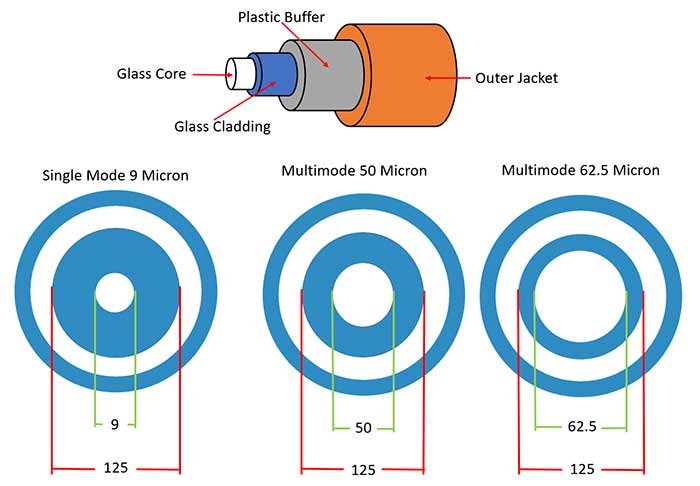
Fiber optic cables use glass or plastic tubes in the center of the cable to transmit data via a beam of light from a laser rather than copper wires used in other types of cabling such as Ethernet. This part of the cable is referred to as the core. Then there is a glass cladding around the core that prevents light from escaping the inner core. Then there is a plastic buffer around the cladding and finally an outer jacket around the buffer.
Because fiber optic cables use light rather than an electrical signal they are not affected by RFI (radio frequency interference) or EMI (electro-magnetic interference). Using this method also allows for the use of longer cable runs because the signal does not have to be repeated or regenerated to keep its signal strength. Fiber optic cable does have distance limitations though which varies depending on the type and speed. For example 100Mbps cabling has a limit of 2 kilometers which is 1.2 miles or 6561 feet while 10Gbps cabling has a limit of only 300 meters or around 1000 feet depending on the specifications of the cable. Fiber optic cabling also comes in a 10Gbps speed with 40Gbps and 100Gbps starting to make their way into datacenters as well.
One important thing to keep in mind when comparing fiber optic cables to Ethernet cables is how you handle them. Making a fiber optic cable is a delicate process and you can’t just twist and bend them as you please when running them through your ceiling or wall because once you break the glass core you are looking at replacing the cable. Ethernet cables have a little more give in how you can handle them since they use copper wires which can take more abuse.
Single Mode vs. Multimode Cabling
There are two main fiber optic cable types in use today and they are single mode and multimode and they differ in how they are made as well as the speed they can transmit data at and the distance it can send that data. Here are the key differences between the two:
Single Mode
- Smaller 9 micron core and a 125 micron cladding (prevents light from escaping)
- Only allows one mode of light to traverse through the cable which lowers attenuation which allows the signal to travel further.
- Used for longer distance cable runs such as over a WAN
- Higher bandwidth than multimode cabling
- More expensive transceiver cost
- Cheaper installation costs
Multimode
- Larger 50 or 62.5 micron core and a 125 micron cladding
- Allows multiple modes of light to traverse through the cable allowing more data to pass through at a given time
- Typically used within the datacenter with LANs
- High bandwidth and speed over short to medium distances
- Signal quality is reduced over long distances
- Cheaper transceiver cost
- More expensive installation costs
Single mode and multimode cable cross section diagram
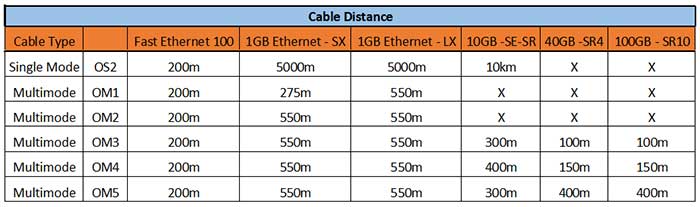
Here is a single mode and multimode speed and distance chart so you can see how each type varies in performance. There are many versions of multimode cables labeled by OM which refers to its optical multi-mode.
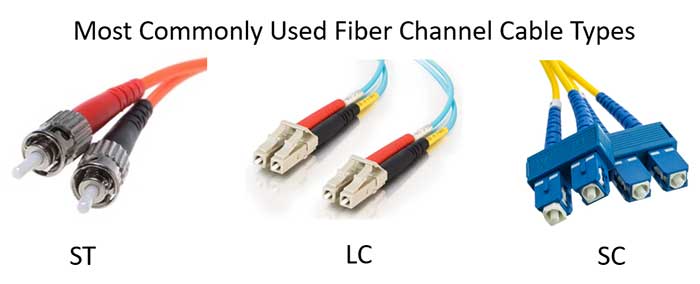
As for the cable connectors there are 3 main types that are in use today. Sure there are others but these 3 are the most common.
- ST – Stands for Straight Tip and uses a keyed bayonet design is similar to that of a BNC connector and used mainly for MMF and SMF FOC. It uses a 2.5 mm ferrule.
- LC – Stands for Lucent Connector and comes in three types (single mode LC APC, single mode LC UPC and multimode LC UPC). It comes with a locking tab to keep it secure. It also uses a 2.5 mm ferrule.
- SC – Stands for Standard Connector and is a low cost cable that also comes with a locking tab to keep it secure. It also uses a 2.5 mm ferrule.
As you can see, fiber channel is a fast and reliable cable medium but there are a lot of factors you need to take into account before deciding if it’s right for your network. With today’s increased Ethernet speeds being applied to copper cables such as Category 6 and 7 cables, you have more options when it comes to deciding if you want to go the fiber optic route or stick with copper. You also have to consider your budget since fiber optic cabling will be more expensive to install and maintain, especially if your IT staff is not familiar with how to take care of it and replace things when they fail. Plus you need to make sure your network devices such as your switches can accept fiber optic connections and have the right type to match the cable type you want to use.
For additional training resources, check out our online IT training courses.
Check out our extensive IT book series.