Last Updated on July 26, 2026
You may or may not have heard the term ones and zeros when people talk about computers or try to act “techy”. What they are referring to is the binary numbering system which computers use to function with 1 representing on and 0 representing off. An example of a binary number might look like 0110010110.
But binary numbers aren’t the only game in town. There is another numbering system that is use by computers that serves a similar purpose and that is the hexadecimal numbering system or hex for short. With the increased usage of IPv6 addresses you will be seeing even more of the hexadecimal numbering system if you are an IT administrator so now is the time to get used to it.
In the computing world, hexadecimal numbering is used for such things as MAC addresses and memory addresses. It is used to represent large numbers in a smaller, easier to read format. An example of a hexadecimal number would look something like 2FE4C0 which is 001011111110010011000000 in binary value. As you can see it’s a lot easier to read, remember or write down 2FE4C0 compared to 001011111110010011000000!
The hex number 2FE4C0 can also be represented as 3,138,752 in decimal value. Here is a breakdown that shows the conversions for the 16 hex values to binary and to decimal.
Base 16 Conversions (0 to 15)
1. Hex Value 0
The hexadecimal value 0 translates to the binary code 0000. It translates to the decimal number 0.
2. Hex Value 1
The hexadecimal value 1 translates to the binary code 0001. It translates to the decimal number 1.
3. Hex Value 2
The hexadecimal value 2 translates to the binary code 0010. It translates to the decimal number 2.
4. Hex Value 3
The hexadecimal value 3 translates to the binary code 0011. It translates to the decimal number 3.
5. Hex Value 4
The hexadecimal value 4 translates to the binary code 0100. It translates to the decimal number 4.
6. Hex Value 5
The hexadecimal value 5 translates to the binary code 0101. It translates to the decimal number 5.
7. Hex Value 6
The hexadecimal value 6 translates to the binary code 0110. It translates to the decimal number 6.
8. Hex Value 7
The hexadecimal value 7 translates to the binary code 0111. It translates to the decimal number 7.
9. Hex Value 8
The hexadecimal value 8 translates to the binary code 1000. It translates to the decimal number 8.
10. Hex Value 9
The hexadecimal value 9 translates to the binary code 1001. It translates to the decimal number 9.
11. Hex Value A
The hexadecimal value A translates to the binary code 1010. It translates to the decimal number 10.
12. Hex Value B
The hexadecimal value B translates to the binary code 1011. It translates to the decimal number 11.
13. Hex Value C
The hexadecimal value C translates to the binary code 1100. It translates to the decimal number 12.
14. Hex Value D
The hexadecimal value D translates to the binary code 1101. It translates to the decimal number 13.
15. Hex Value E
The hexadecimal value E translates to the binary code 1110. It translates to the decimal number 14.
16. Hex Value F
The hexadecimal value F translates to the binary code 1111. It translates to the decimal number 15.
Understanding the Hexadecimal Structure
1. The Base 16 System
The hexadecimal numbering system is a base 16 system divided up into groups of 4 bits (called a nibble). Since we are used to 0-9 for our decimal numbering system we use the letters A-F to represent the numbers from 11 to 15 to make up 16 values in total (0-F). The word hexadecimal actually translates to the word sixteen.
2. Value Representations
As you can see in the data above, the hexadecimal values go from 0 to F and the decimal equivalents go from 0 to 15. You might have noticed that a 4 digit binary number can be represented by one hex number which can greatly reduce how long a value representation needs to be.
3. Calculating Large Numbers
The reason hexadecimal numbers are able to be used to represent very large numbers is because each value in the hex number is worth 16 times as much as the value to the right of it. This is compared to 10 times the value with the base 10 decimal system. And yes the values increment from right to left just like with binary (which is a base 2 system).
4. Exponential Growth
The formula will look something like 16 to the 7th power, 16 to the 6th power, 16 to the 5th power, and so on. As you can see these values can get pretty large the more left you go. For example, 16 to the 4th power equals 65,536. 16 to the 7th power equals 268,435,456.
Base 16 Conversions (16 to 32)
So what happens if you want to go higher than the decimal value of 15? In that case the structure would start to look like this.
1. Decimal Value 16
The decimal value 16 translates to the hexadecimal value 10. It translates to the binary code 0001 0000.
2. Decimal Value 17
The decimal value 17 translates to the hexadecimal value 11. It translates to the binary code 0001 0001.
3. Decimal Value 18
The decimal value 18 translates to the hexadecimal value 12. It translates to the binary code 0001 0010.
4. Decimal Value 19
The decimal value 19 translates to the hexadecimal value 13. It translates to the binary code 0001 0011.
5. Decimal Value 20
The decimal value 20 translates to the hexadecimal value 14. It translates to the binary code 0001 0100.
6. Decimal Value 21
The decimal value 21 translates to the hexadecimal value 15. It translates to the binary code 0001 0101.
7. Decimal Value 22
The decimal value 22 translates to the hexadecimal value 16. It translates to the binary code 0001 0110.
8. Decimal Value 23
The decimal value 23 translates to the hexadecimal value 17. It translates to the binary code 0001 0001.
9. Decimal Value 24
The decimal value 24 translates to the hexadecimal value 18. It translates to the binary code 0001 0010.
10. Decimal Value 25
The decimal value 25 translates to the hexadecimal value 19. It translates to the binary code 0001 0011.
11. Decimal Value 26
The decimal value 26 translates to the hexadecimal value 1A. It translates to the binary code 0001 1010.
12. Decimal Value 27
The decimal value 27 translates to the hexadecimal value 1B. It translates to the binary code 0001 1011.
13. Decimal Value 28
The decimal value 28 translates to the hexadecimal value 1C. It translates to the binary code 0001 1100.
14. Decimal Value 29
The decimal value 29 translates to the hexadecimal value 1D. It translates to the binary code 0001 1101.
15. Decimal Value 30
The decimal value 30 translates to the hexadecimal value 1E. It translates to the binary code 0001 1110.
16. Decimal Value 31
The decimal value 31 translates to the hexadecimal value 1F. It translates to the binary code 0001 1111.
17. Decimal Value 32
The decimal value 32 translates to the hexadecimal value 20. It translates to the binary code 0010 0000.
Breaking Down the Math
1. Hexadecimal Logic
Keep in mind that just because decimal 16 is displayed as 10 doesn’t mean that it’s actually the number 10. It is actually 1+0. At the same time the decimal number 17 is really 1+1. This makes a little more sense if you compare the hex number to its binary equivalent.
2. Binary Equivalents
For example 1+0 in binary is really 0001 (for 1) and 0000 (for 0). As for the number 26 which is represented as 1A in hex, think of it as 1+10. This is because the decimal value for 1 is 1 in hex and the decimal value for 10 is A in hex.
3. Numbering System Loops
The hex numbering system goes 0-9 then starts at A-F. So the letter A comes after the 9 in 19. Then 1 in binary is 0001 and A in binary is 1010.
4. Use the Windows Calculator
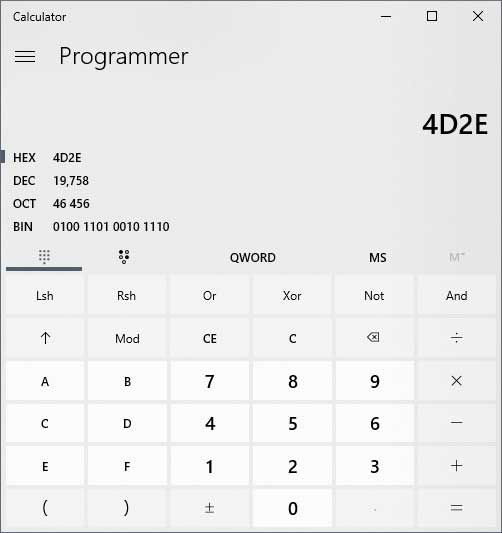
Hexadecimal numbering can be confusing just like binary numbering. But once you play around with it a little and compare hex to binary to decimal things will make a little more sense. After you have the basic understanding you can then use online calculators to do your conversions. You can even use the built-in Windows calculator in programmer mode.
5. Automatic Translations
As you can see in the image of the calculator above, you can change the numbering scheme to the exact type you want. You can select hex, dec, oct or bin. Then enter your number and it will instantly convert it to all the other values, making it incredibly easy to do the complex translations.