Last Updated on July 25, 2026
There are thousands of words, phrases and terms used in the networking world. Since most of us are not future Cisco employees we decided to list some of the more common terminology you may come across or need to know. Here is a listing of important words, phrases and terms you should know about networking.
Core Networking Concepts
1. Bandwidth
Bandwidth is the rated throughput capacity of a given network media or protocol. It measures the maximum amount of data that can be transmitted in a fixed amount of time over a specific connection.
2. Backbone
A backbone is a high-speed data link joining together several disparate networks. It acts as the primary highway for data traffic, connecting smaller local networks into a massive wide area network.
3. Bit
A bit is the smallest unit of information in computing having just two possible values. It exists as either of the binary digits 0 or 1.
4. Byte
A byte is a series of consecutive binary digits that are operated upon as a single unit. There are exactly 8 bits in a single byte of data.
5. Collision
A collision is an attempt by two distinct devices to transmit over the network at the exact same time. This usually results in the data packets being corrupted or lost entirely.
Network Hardware and Cabling
1. Category 5 (Cat 5) Cable
A type of twisted pair network wiring in which there is a certain number of twists per foot to reduce interference. It used to be the most commonly used network cabling. Newer, much faster types of these Ethernet cables are called Cat6, Cat7, and Cat8.
2. Coaxial Cable
A type of cable consisting of two insulating layers and two conductors most commonly used in older networks. It is still heavily used today by internet service providers to deliver broadband cable internet to residential homes.
3. Ethernet
Ethernet is the most widely installed local area network technology standard. It was originally developed during the late 1970s through a partnership of DEC, Intel, and Xerox.
4. Fiber Optic
A cable technology that uses glass or plastic threads called fibers to transmit data using light pulses. It is a very fast technology that offers significantly higher bandwidth than traditional copper cables.
5. Network Interface Card (NIC)
A hardware device inside a computer or other network device that enables physical communication with a network. It provides the dedicated circuitry required to process data packets.
6. RJ-45
Standard plastic connectors used to terminate unshielded twisted-pair cable. They are most commonly used with Cat6 and up Ethernet network cabling.
Network Architecture and Devices
1. Domain
A domain is a group of computers and devices on a network that are administered as a single, cohesive unit. They share a common central directory database containing user accounts and security policies.
2. Gateway
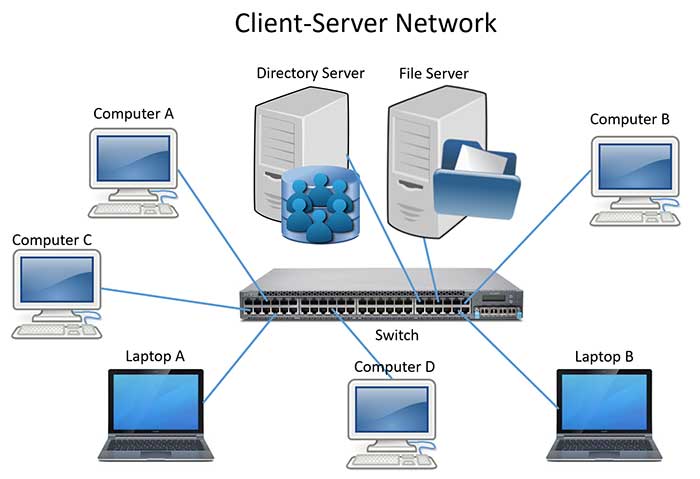
A gateway is a device on a network that serves as an entrance to another completely different network. It routes traffic between networks that use different communication protocols.
3. Hub
A common connection point for computers and devices in a network that takes an incoming signal and blindly repeats it on all other ports. Hubs are largely obsolete today, replaced by intelligent network switches.
4. Router
A device that intelligently routes and forwards data packets across multiple networks. Your home Wi-Fi router connects your local devices to the massive public internet.
5. Server
A computer that handles centralized requests for data, email, files, and other network services from other computers called clients.
IP Addressing and Protocols
1. DHCP
Dynamic Host Configuration Protocol is a TCP/IP protocol that dynamically assigns an IP address to a computer. Dynamic addressing simplifies network administration because the software keeps track of IP addresses rather than requiring a network administrator to do so manually.
2. DNS
Domain Name System is an internet service that translates human-readable domain names into machine-readable IP addresses. For example, it translates www.google.com into 142.250.190.46.
3. Dynamic DNS
A method of keeping a static domain name linked to a constantly changing IP address. It uses a pool of available IP addresses so you can use web applications that normally require a highly expensive static IP address.
4. IP Address
A 32-bit address assigned to hosts using the TCP/IP protocol. Each computer and device on the public internet has a unique IP address. An example of a local IPv4 address is 192.168.1.50.
5. MAC Address
Media Access Control is a unique identifier attached to most forms of networking equipment. It is physically burned into the device hardware during manufacturing and cannot be permanently changed.
6. Packet
The standard unit of data sent across a network. Large data files are broken up into thousands of tiny packets for sending over a packet switching network.
7. PING
Packet Internet Groper is a command line utility used to test basic connectivity to a device over a TCP/IP network. It sends a small packet and waits for an echo reply.
8. Protocol
A set of strict rules determining the exact format and transmission of data over a network. Both devices must agree on the protocol to successfully communicate.
9. Subnet
A portion of a network that shares a common address component but is isolated on a different segment than the rest of the network. This improves security and reduces network congestion.
10. TCP/IP
Transmission Control Protocol/Internet Protocol is a suite of protocols used as the primary basis of the internet. It can also be used on isolated internal networks.
Network Types and Measurement
1. LAN
Local Area Network is a computer and data network which is strictly confined to a limited geographical area, like a single office building or residential home.
2. WAN
Wide Area Network is a massive network linking together smaller networks located in completely different geographic areas across the globe.
3. Megabit
A measure of data transmission speed. It equals 1 million bits per second or approximately 125,000 characters per second. Internet speeds are almost always advertised in Megabits (Mbps).
4. Megabyte
A unit of measure for memory or hard disk storage capacity. Exactly 1,000 kilobytes equals 1 MB.
5. Gigabyte
A unit of measure for memory or hard disk storage capacity. Exactly 1024 megabytes equals 1 Gigabyte.
6. Terabyte
A unit of measure for massive memory or hard disk storage capacity. Exactly 1024 Gigabytes equals 1 Terabyte.
7. UNC Path
Universal Naming Convention provides a standard naming format for identifying network resources. UNC names consist of three parts: a server name, a share name, and an optional file path.