Last Updated on April 24, 2026
Every device connected to the internet, whether it’s your smartphone, laptop, or a massive web server needs an IP address to communicate. Think of an IP address as a digital mailing address that ensures data packets reach the correct destination.
But not all IP addresses act the same way. In the world of networking, IP addresses are split into two main categories: Static IP addresses and Dynamic IP addresses.
While both allow devices to communicate over TCP/IP networks, the choice between them comes down to consistency, manageability, and your specific network needs. In this guide, we will break down the exact differences between static and dynamic IPs, how they work, and which one you should be using for your home or business network.
What is a Static IP Address?
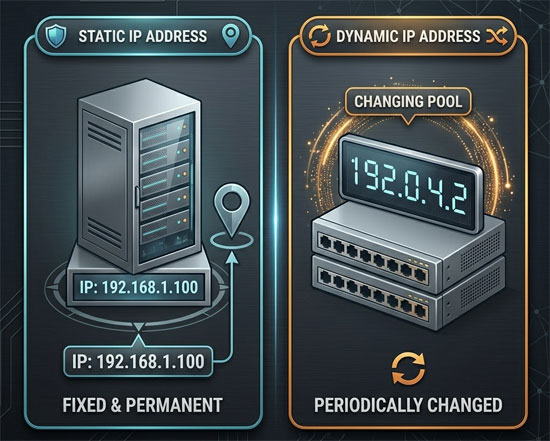
A static IP address is exactly what it sounds like: an address that stays the same and never changes unless a network administrator manually alters it. Both static and dynamic methods are used together on the same network, but static IPs are reserved for devices that need permanent locations.
When a device is assigned a static IP, you always know exactly where to find it. This is critical for devices that need to be consistently accessed by other computers or users over the internet.
Common Uses for Static IP Addresses:
- Web and DNS Servers: Large websites use static IPs. If a major site’s IP address constantly changed, global DNS servers would struggle to keep up, and you wouldn’t be able to load the site reliably. (For example, Google’s famous public DNS server is permanently set to 8.8.8.8).
- Network Printers and File Servers: In an office environment, setting a static IP for printers ensures that employees’ computers don’t lose connection every time the office network reboots.
- Remote Access: If you use Remote Desktop Connection or a VPN to access your work PC from home, a static IP ensures you never get locked out due to a sudden address change.
What is a Dynamic IP Address?
A dynamic IP address is a temporary address that changes over time. Instead of manually configuring each device, your router or Internet Service Provider (ISP) automatically assigns dynamic IPs using a protocol called DHCP (Dynamic Host Configuration Protocol).
When your smartphone or laptop connects to Wi-Fi, the DHCP server “leases” it an IP address. When that lease expires, or if you disconnect and reboot your router, the device may be assigned a completely different IP address from an available pool.
Common Uses for Dynamic IP Addresses:
- Home Internet Connections: Almost all consumer ISPs assign a dynamic public IP to your home modem. It is much cheaper and more efficient for ISPs to recycle IP addresses as users log on and off rather than giving every house a permanent address.
- Smartphones and Laptops: Devices that frequently disconnect, travel, and reconnect to different networks rely entirely on dynamic DHCP assignments.
- Improved Security: Because your public IP address periodically changes, it can make it slightly harder for malicious attackers to target your specific home network over a long period.
Static vs. Dynamic IP: Which One Do You Need?
For the vast majority of home users, a dynamic IP address is perfectly fine. It requires zero manual configuration, prevents IP address conflicts (where two devices accidentally get assigned the exact same address), and is managed entirely behind the scenes by your router.
However, you might want to log into your router and configure a static local IP address for specific devices if you are:
- Hosting a dedicated gaming server (like Minecraft or Palworld) for your friends.
- Setting up port forwarding for local security cameras.
- Running a Plex media server to stream movies to your smart TVs.
Does a Static IP Make Your Internet Faster?
No. A common misconception in the gaming community is that getting a static IP address will lower your ping or increase your download speeds. The choice between static and dynamic IPs has absolutely no impact on your internet speed or performance. It simply dictates how devices are identified and located on the network.
For information on how to find your IP address and what type you have click here.
For additional training resources, check out our online IT training courses.
Check out our extensive IT book series.