Last Updated on May 6, 2026
If you have ever set up a new smartphone, bought a new laptop, or tried to add your work email to Microsoft Outlook, you have undoubtedly hit a confusing roadblock. The setup wizard pauses and asks you to make a highly technical choice: Do you want to set this account up as POP3 or IMAP?
If you click the wrong one, you might end up wondering why an email you read on your phone still shows up as “unread” on your computer, or worse, why emails are mysteriously vanishing from your inbox entirely. POP3 and IMAP are simply two different languages that your email app uses to talk to your email provider’s servers.
The choice you make dictates exactly how your messages are downloaded, stored, and synced across your devices. To save you from future headaches, here is a complete breakdown of how both protocols work and which one you should be using today.
What is POP3? (The Old School Method)
1. Understand the Protocol Origins
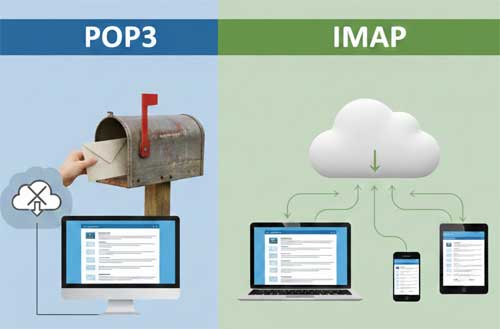
POP3 stands for Post Office Protocol. It was invented in the early days of the internet when people had painfully slow dial-up connection speeds and very limited server storage. Think of POP3 exactly like your physical home mailbox. When your mail carrier drops off a letter, it is no longer at the post office. It is physically sitting inside your house.
2. How POP3 Downloads Messages
When an email app like Thunderbird or Apple Mail connects using POP3, it downloads all your new messages directly to your computer’s local hard drive. By default, it then immediately deletes the original copies from your email provider’s server. Your local computer becomes the only place those files exist.
3. The Pros of Using POP3
There are a few distinct pros to using POP3 for your email. Because the emails are moved off the server and onto your hard drive, you will never run into “Mailbox Full” warnings from your email provider. It is also excellent for offline viewing or strict privacy, as your data is kept locally in your own hands.
4. The Cons of Using POP3
However, there are some major cons to using POP3 as well. This protocol is generally terrible for modern users. If you download an email to your work computer, it is gone from the server, meaning that email will never show up on your smartphone later. Furthermore, if your computer’s hard drive crashes and you do not have a backup, your entire email history is permanently destroyed.
What is IMAP? (The Modern Standard)
1. Understand the Protocol Origins
IMAP stands for Internet Message Access Protocol. It was designed specifically for the modern era where users switch between phones, tablets, and desktop computers constantly throughout the day. Instead of downloading and deleting your mail, think of IMAP as a digital window. Your email app simply looks through the window at the messages sitting safely on your provider’s server.
2. The Pros of Using IMAP
There are some massive pros to using IMAP for your daily communications. Everything stays in perfect sync across all of your hardware. If you read an email on your iPhone while riding the train, it will instantly show up as “read” on your desktop computer at the office. If you create a new folder or delete a piece of spam on one device, that change is immediately mirrored everywhere else.
3. The Cons of Using IMAP
The cons of IMAP are mostly related to storage space limits. Because every single email and attachment lives permanently on the server, you are at the mercy of your email provider’s storage quota. If you use a free service like Gmail, you will eventually hit their 15GB data cap. Once that happens, you will be forced to either delete old emails or pay for a larger storage plan.
The Verdict: Which Email Setup Should You Choose?
1. The Standard Choice for Most Users
For 99 percent of users today, IMAP is the absolutely correct choice. We live in a multi-device world where switching between screens is second nature. Having your inbox flawlessly sync across your laptop, your web browser, and your smartphone is absolutely essential. Almost all major providers like Outlook.com, Yahoo, and Gmail default to IMAP for this exact reason.
2. The Niche Choice for Offline Archives
You should only ever choose POP3 if you are setting up a dedicated, highly secure offline archive computer. It is also acceptable if your company’s IT department specifically demands it for regulatory compliance. Otherwise, stick with IMAP to ensure your data stays perfectly synced and safe in the cloud.