Last Updated on July 25, 2026
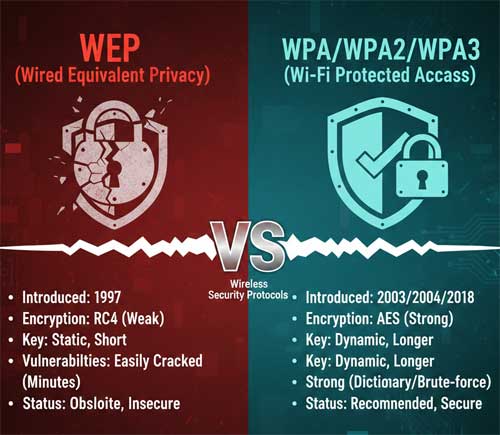
WEP (Wired Equivalent Privacy) was originally intended to give you the same or similar level of security as on a wired network but it turns out that it does not. WEP works by using secret keys, or codes to encrypt data. WEP is defined in the 802.11b standard and aims to provide security by encrypting data over radio waves so that it is protected as it is transmitted from one end point to another.
The network card encrypts the data before transmission using an RC4 stream cipher provided by RSA Security. The receiving station, such as an access point performs decryption upon receiving the frame. WEP only encrypts data between 802.11 stations. The Access Point and the client must know the codes in order for it to function. WEP has three settings: Off (no security), 64-bit (weak security) and 128-bit (higher security).
The Downfall of WEP Security
1. Easily Cracked Passphrases
WEP is not difficult to crack, and using it reduces performance slightly. The WEP concept of using a passphrase is introduced so that you do not have to enter complicated strings for keys manually. The passphrase you enter is converted into hex keys for the actual encryption process.
2. Static Key Vulnerabilities
The static nature of the shared secret keys is its absolute greatest weakness. The 802.11 protocol does not provide any functions that support the automatic exchange of keys among stations. As a result, system administrators and users generally use the exact same keys for long periods of time.
3. Shared Network Risks
This static configuration gives hackers plenty of time to monitor and hack into WEP enabled networks. Most wireless networks that use WEP have one single WEP key shared between every node on the network. Anyone with a basic packet sniffer can easily intercept and decrypt your private browsing data.
The Introduction of WPA and WPA2
1. WPA and TKIP Encryption
WPA (WiFi Protected Access) is the new security standard adopted by the WiFi Alliance consortium. WiFi compliance ensures interoperability between different manufacturer’s wireless equipment. WPA is a much improved encryption standard that delivers a level of security beyond anything that WEP can offer. It bridges the gap between WEP and 802.11i networks.
2. Dynamic Frame Synchronization
WPA uses Temporal Key Integrity Protocol (TKIP), which is designed to allow WEP to be upgraded through corrective measures that address the existing security problems. WPA is able to achieve over 500 trillion possible key combinations and re-keying of global encryption keys is required. The encryption key is changed after every frame using TKIP. This allows key changes to occur on a frame by frame basis and to be automatically synchronized between the access point and the wireless client.
3. WPA2 and AES Standards
WPA2 is an implementation of WPA and provides stronger data protection and network access control. It provides WiFi users with a higher level of assurance that only authorized users can access their wireless networks. WPA2 is based on the IEEE 802.11i standard and provides government grade security. It defines new encryption key protocols including the Temporal Key Integrity Protocol (TKIP) and the highly secure Advanced Encryption Standard (AES).
4. Personal vs Enterprise Versions
There are two distinct versions of WPA2 available for network administrators to deploy. WPA2 Personal protects unauthorized network access by utilizing a standard setup password shared among trusted users. WPA2 Enterprise verifies network users through a dedicated authentication server to issue unique credentials to every single employee.
Modern Security with WPA3
1. The Latest Wi-Fi Standard
WPA3 is the latest Wi-Fi security standard introduced by the Wi-Fi Alliance to replace WPA2 completely. It offers significantly stronger encryption and improved protection against modern cyber threats. You will find this advanced security protocol integrated into all modern networking hardware manufactured today.
2. Preventing Offline Attacks
It uses Simultaneous Authentication of Equals (SAE) to prevent offline password attacks. This specific protocol provides forward secrecy so captured data cannot be decrypted later by malicious actors. It also enhances security for public networks through encrypted connections even without requiring users to enter passwords.
3. Hardware Requirements
WPA3 is now officially required for all new Wi-Fi Certified devices hitting the consumer market. It is commonly supported on routers equipped with Wi-Fi 6, Wi-Fi 6E, and the brand new Wi-Fi 7 standards wireless bands. This makes it a significant upgrade for both personal and enterprise networks seeking better security and easier device onboarding.