Last Updated on August 15, 2026
If you work with computers for a living or even do your own computer repair and configuration at home, you may have heard of a term called APIPA. This acronym officially stands for Automatic Private IP Addressing. If you are familiar with basic networks, you know that computers absolutely need an IP address to communicate with each other. This is exactly how your local network in the office works and also how the public internet functions.
An IP address looks something like 192.168.1.100 and will vary depending on the specific network configuration. Each computer on the active network has to have a completely unique IP address to communicate successfully without causing a massive data collision.
How IP Addresses Are Assigned
1. The Need for Valid IP Addresses
When a computer does not have a valid IP address, it will not be able to do things such as log into a secure domain. It also cannot print to network printers or pull files off of a centralized file server. The machine essentially becomes completely isolated from the rest of the digital world.
2. Static vs Dynamic Addressing
Computers are assigned IP addresses manually through static IP addressing or automatically through dynamic IP addressing. Network administrators usually reserve static addresses for critical infrastructure like servers and heavy network printers. Client machines like laptops and smartphones almost always rely on dynamic IP addressing to save time.
3. The Role of the DHCP Server
Computers that get their IP addresses automatically need a reliable source to provide those addresses instantly. Usually this comes in the form of a dedicated DHCP server. This specific server has the main function of providing IP addresses to all requesting network clients.
4. DHCP in Home Networks
For many home users you usually get your public IP address directly from your ISP. Your internal private IP address comes from your broadband internet modem. If you have a standard wireless router, then it most likely acts as the DHCP server and provides your computer’s IP address automatically.
5. IP Address Leases
These IP addresses are officially leased to the computer for a set amount of time. They are not permanent assignments. The computer must renew the lease periodically or else the IP address will expire and be returned to the available DHCP pool.
(Image: APIPA diagram)
Understanding the APIPA Fallback
1. Failing to Find a DHCP Server
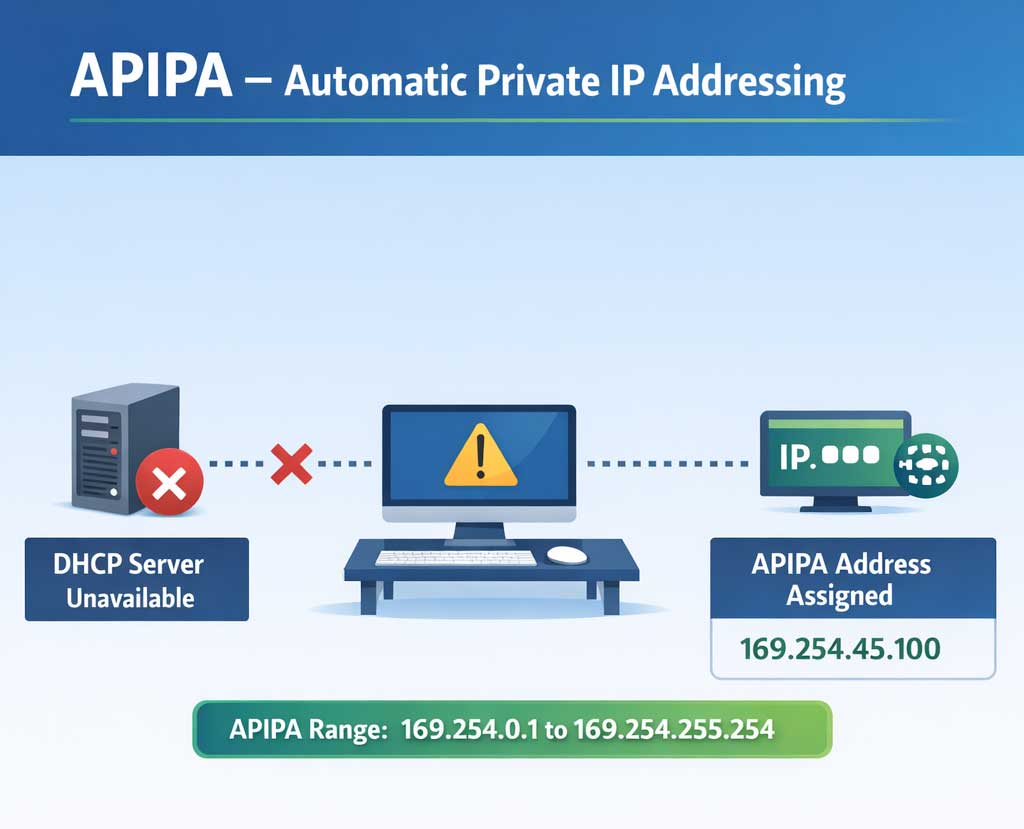
Your computer will be set to either have a static or dynamic IP address in its network adapter configuration. If it is set to get its IP address automatically and there is no reachable DHCP server on the network, the process fails. The computer will wait for a short period before taking matters into its own hands.
2. The 169.254.x.x Address Range
When the DHCP request times out, the operating system will automatically give itself an APIPA address. This fallback address will always be in the form of 169.254.x.x. The last two blocks (represented by the x) can be a variety of different randomly generated numbers.
3. The Purpose of APIPA
The main purpose of an APIPA address is basic local continuity. When the computer lease of its IP address expires, it will have at least some type of address that can be used for local network communication. It prevents the network adapter from completely shutting down.
4. Limited Network Communication
The computer will only be able to communicate with other computers that also have a 169.254.x.x address. This happens if an entire office loses connection to the main DHCP server simultaneously. The machines can still theoretically share files with each other locally.
5. The Subnet Isolation Problem
If other devices such as servers and printers have a static IP address, the APIPA client will not be able to communicate with them at all. This happens because the 169.254.x.x address places the client on a completely different IP subnet. The computer cannot route traffic across subnets without a default gateway, which APIPA does not provide.
6. Troubleshooting Network Connectivity
When you are troubleshooting network or internet connectivity, it is always a very good idea to check your IP settings first. You must make absolutely sure you have a valid IP address assigned to your adapter. If you run an ipconfig command and see an APIPA address, you immediately know to start looking at your DHCP source to fix the outage.
For additional training resources, check out our online IT training courses.
Check out our extensive IT book series.