Last Updated on October 21, 2026
In today’s fast paced mobile society everyone is connected to everything at all times with their laptops, tablets and smartphones. It’s almost like if you aren’t “connected” 24/7 you are doing something wrong. And when people can’t access the information they want or need instantly then they start to panic.
Of course people want to be connected to their work as well but most of the time you can’t take everything from work home with you. You need a secure way to access resources at work such as your desktop computer or file server. The way people accomplish this is by using a VPN or Virtual Private Network connection from their home or other location and connect directly to their work either into the network itself or directly to a specific computer. This way they can use their home computer as if it was actually sitting on the desk at the office.
Understanding VPN Connections and Tunnels
1. Create a Secure Digital Tunnel
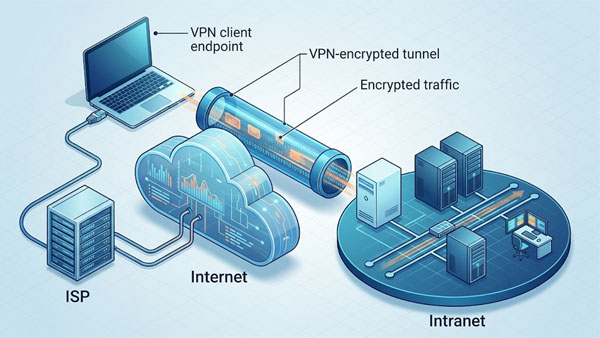
The VPN connection is accomplished by making a dedicated secure tunnel through the internet from the remote location to the destination location. The traffic is heavily encrypted so anyone intercepting it will not be able to read it. Hackers just see scrambled data instead of your private files.
2. Establish Remote Access Connections
When it comes to types of VPNs most people use a remote access VPN. You have client software running on the remote computer and you connect into your corporate firewall with a username and password. This specific login process grants you secure access to the internal network. From there you can either have unrestricted access to the network or be restricted to accessing one or more individual computers.
3. Utilize Site to Site VPNs
Another type is a site to site VPN where the connection is always up and running. This allows one or more users from the remote site seamless access to the other site. This type of connection can be either one way or both ways depending on your exact business needs.
VPN Clients, Firewalls, and Encryption
1. Match Your Client to the Firewall
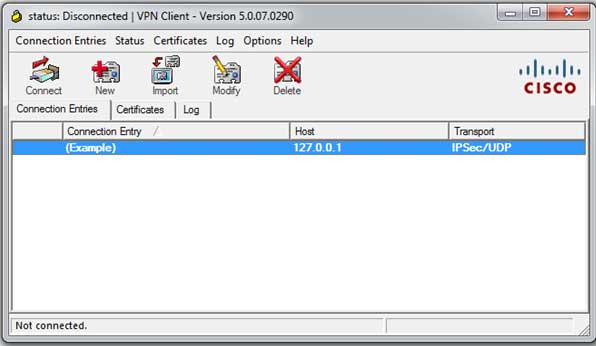
For the VPN clients you will use the exact software that matches the type of firewall you will be connected to at the remote site. Common brands are Cisco, Checkpoint, Palo Alto, Juniper and SonicWall. Using the correct proprietary software guarantees a stable connection to your corporate network.
2. Configure Alternative Firewall Solutions
You can also setup Windows and Linux servers to act as firewalls for VPN access if you don’t want to invest in an actual hardware firewall. Some modern network routers also have VPN functionality built right in. There are also other VPN web based services like SecureLink that will use appliances at the corporate site. The VPN connection will then be initiated via a standard web browser.
3. Choose the Right Encryption Protocol
There are many encryption methods and protocols used for VPN connections. Some are much more secure than others so you need to make sure the devices on both ends support whatever protocol you decide to use. Some examples are PPTP, L2TP, IPsec, OpenVPN, SSTP and IKEv2. WireGuard is also incredibly popular in 2026 for its top-tier speed and security.
4. Plan Your Security Deployment
Setting up a VPN connection is not super hard but it will take a little homework on your part. You must make sure you get things right and make sure you have adequate security in place. Check out this helpful link for more information about how VPNs work and what you can do with them.
See Next:
OpenVPN vs. PPTP