Last Updated on May 27, 2026
Should you be using LUN Masking or Zoning with your storage?
When it comes to networked storage you have a few different options and should investigate them to see which option suits the needs of your business and IT infrastructure. The 3 main types of storage solutions out there are Fibre Channel, iSCSI and NAS and each has their own advantages and disadvantages. We will not be going into those specifics right now but will in a future article.
So for now we are going to be talking about zoning vs LUN (Logical Unit Number) masking and what they do and how they differ when it comes to granting access to your storage devices. It is possible to use zoning and LUN masking at the same time but it’s not a requirement. Neither one of these are used with NAS storage and zoning is only used with fiber channel storage. LUN masking can be used with iSCSI storage and fiber channel storage. Now let’s discuss LUN masking and zoning.
Understanding LUN Masking
1. Hide Storage from Unauthorized Hosts
LUN masking is the strict process of masking or hiding LUNs from hosts that shouldn’t see them or have access to them. If the storage array denies visibility of the LUN to a particular host, that storage volume effectively does not exist as far as the host is concerned. By masking the LUN you absolutely prevent multiple hosts from writing data to the same LUN simultaneously. This eliminates the potential to cause some serious network data corruption.
2. Configure the Access Control List
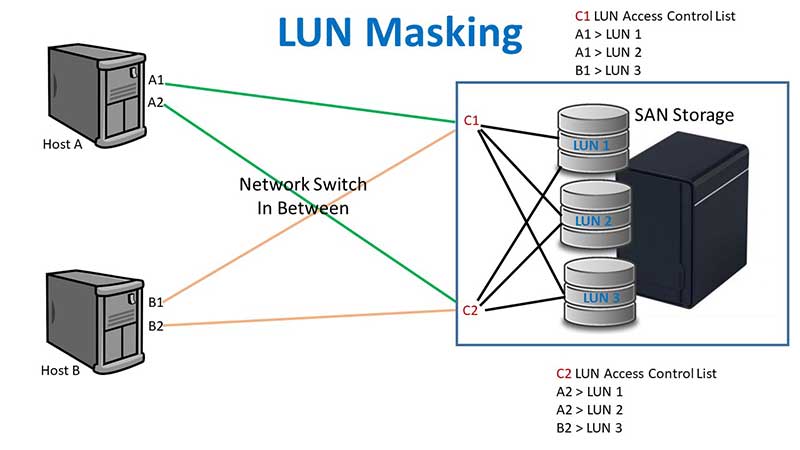
You control this security barrier by configuring the ACL on your storage controllers. As you can see in our configuration example, the ACL for controller 1 says that HBA A1 has access to LUN 1 and LUN 2. It also dictates that HBA B1 has access to LUN 3. The ACL for controller 2 mirrors this setup for redundancy. It says that HBA A2 has access to LUN 1 and LUN 2 and that HBA B2 has access to LUN 3.
3. Share LUNs Safely Between Clusters
To simplify the logic, host A securely accesses LUNs 1 and 2 while host B remains isolated on LUN 3. This way there is not more than one host having access to a particular LUN risking corruption. That doesn’t mean you can’t share a LUN between hosts because that is actually a fairly common procedure. VMware hosts for example can have access to the exact same LUNs. You simply create multiple datastores on a single LUN to distribute your virtual machines across different hosts safely.
Understanding SAN Zoning
1. Isolate Storage on the Network Fabric
SAN zoning is the network-level process of separating devices, hosts and storage arrays. You create secure zones where only certain devices can communicate with specific storage resources that live in the same zone. It is also used as a hard barrier to keep host servers from communicating directly with each other. This zoning is done exclusively on the storage fabric. The fabric consists entirely of the network switches that connect the hosts down to the storage.
2. Deploy Single Initiator Zones
Most storage engineers deploy single initiator zones for maximum performance. This means you have just one host initiator per zone but you can map it to multiple storage targets. You can easily make initiators and targets members of multiple distinct zones at the same time. This overlapping design allows complex routing without sacrificing hardware isolation.
3. Implement Port-Based Hard Zoning
There are 2 kinds of zoning that are commonly used in enterprise environments. Hard zoning is based entirely on physical switch ports. Whatever hardware you connect to a certain port associated with a zone automatically becomes part of that exact zone. This type of zoning is less secure. Anyone can connect a rogue server to an open port and instantly breach your storage zone.
4. Implement WWN-Based Soft Zoning
Soft zoning operates differently by targeting unique WWNs (World Wide Names). You can move the physical cables around to different ports on the network. The hardware will stay locked in the same zone because the device WWN doesn’t change. If you have to replace a failed HBA card, you will have to manually do some reconfiguring of the zone mappings. There is still a minor threat of WWN spoofing to get around this type of security. You can also configure aliases for WWPNs so you don’t have to remember the entire 64 bit hex number. This is the more popular configuration of the two.
5. Group Zones into Active Sets
Network administrators group individual zones into larger collections called zone sets. A zone set can contain dozens of different zones to build out your routing logic. A single zone can also be placed in more than one zone set. The storage switch enforces a strict rule where only one complete zone set can be active at a time.
6. Build Redundant Fabric Connections
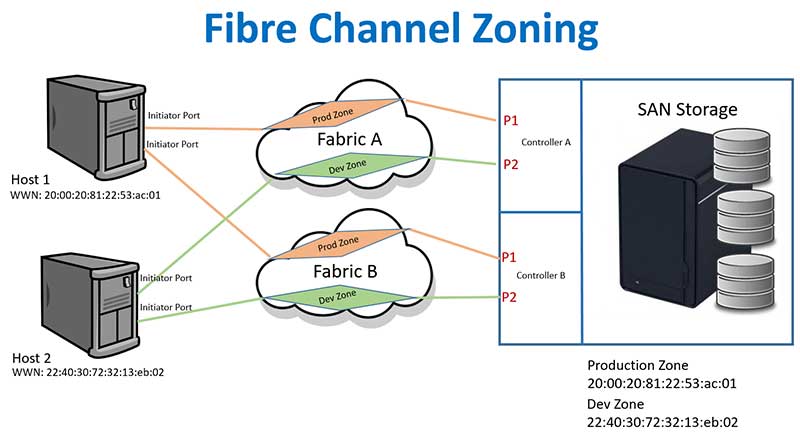
In the visual example below we have 2 hosts that each require storage access. Each host maintains a dedicated physical connection to Fabric A and Fabric B for failover protection. Both network fabrics then connect down to Controller A and Controller B on the primary storage array. This redundant layout guarantees your servers survive a massive switch or controller hardware failure.
7. Segment Production and Development Traffic
You must segment your traffic types securely across the fabrics. There is a connection from the HBAs on Host 1 routed straight to the Prod Zone on Fabric A. We duplicate that exact path to the Prod Zone on Fabric B for redundancy. There is also a completely separate connection from the HBAs on Host 2 connected to the Dev Zone on Fabric A and the Dev Zone on Fabric B. This strict configuration keeps Host 1 and Host 2 from ever communicating with each other. It permanently keeps the Production Zone and Development Zone separate as well.
For additional training resources, check out our online IT training courses.
Check out our extensive IT book series.