Last Updated on February 5, 2026
The video card is the hardware component in your computer that translates the video signal from your processor to your monitor. Without one you cannot see what is going on with your computer and therefore cannot really do anything with it. Many computers have video cards built directly into the motherboard. Others have add-on cards that are plugged into a certain type of expansion slot on the motherboard.
Just because your computer uses a built in video chip does not mean you cannot upgrade and add a standalone card. You just need to make sure you get the exact right type to match the physical slot available on your motherboard, especially if you are building your own computer. Installing a dedicated GPU provides massive performance gains over integrated graphics.
1. Assess Your Computing Needs
When it comes to choosing the right video card, you need to determine exactly what you will be doing with your computer. Will you be just surfing the internet and writing emails? Playing demanding 3D video games requires significantly more processing power than editing basic home movies. You must identify your exact daily workload before buying parts for a new custom PC build.
2. Identify the Three Expansion Slots
You historically have three distinct choices when it comes to video card interfaces on a PC motherboard. These are standard PCI, AGP, and PCI Express. Each interface standard represents a completely different era of computing technology. Modern 2026 systems exclusively use PCI Express for all high speed hardware communication.
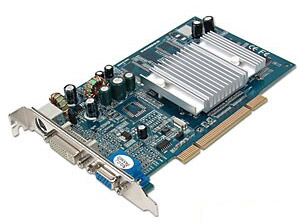
3. The Original PCI Interface Standard
Standard PCI represents the absolute oldest of the three types of expansion slots. Manufacturers also used this shared bus topology for legacy devices like sound cards and early network adapters. The original 32-bit architecture provides a maximum bandwidth of just 133 MB/s. You will only find standard PCI video cards in ancient retro computing builds today.
4. The AGP Graphics Port Upgrade
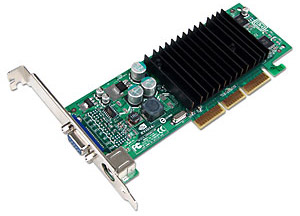
Engineers designed the Accelerated Graphics Port specifically to handle early 3D graphics applications. AGP uses a dedicated point to point channel so the graphics controller can directly access system memory. It provides a massive bandwidth leap over standard PCI with speeds ranging from 266 MB/s up to 2.1 GB/s. Motherboard manufacturers stopped including AGP slots entirely around the late 2000s.
5. The Dominance of PCI Express
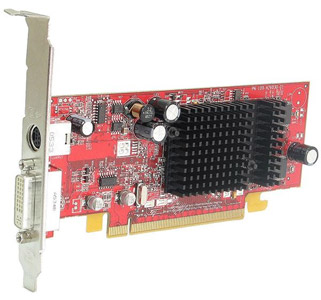
PCI Express completely replaced both standard PCI and AGP interfaces for modern hardware components. This architecture relies on a two way serial connection to avoid performance bottleneck problems. A dedicated point to point bus ensures your graphics card never shares bandwidth with your storage drives. PCI Express provides the blistering data transfer speeds required by modern 4K gaming and 3D rendering.
6. PCI Express 1x and 2x Connections
The smallest PCI Express slots are designated as 1x and 2x sizes. A PCIe 1x slot uses a single dedicated data lane. This provides enough bandwidth for basic sound cards or simple capture devices. Early PCIe 1.0 versions capped this single lane at 250 MB/s.
7. PCI Express 4x and 8x Interfaces
Midrange expansion cards utilize the 4x and 8x PCI Express slot lengths. The original 4x slots pushed 1000 MB/s while the 8x slots doubled that throughput to 2000 MB/s. Server administrators often plug high speed network interface cards into these medium sized slots. Modern motherboards sometimes wire a physical 16x slot to only run at 8x electrical speeds to save manufacturing costs.
8. PCI Express 16x and 32x Configurations
Your massive dedicated graphics card will always plug into a full length PCI Express 16x slot. The original PCIe standard pushed 4000 MB/s through these sixteen dedicated data lanes. Rare 32x configurations existed in enterprise server environments but never reached consumer desktop motherboards. You must always seat your primary GPU in the top 16x slot closest to your processor.
9. Modern PCI Express Generations
The original PCIe bandwidth numbers look incredibly slow by 2026 standards. The technology industry constantly releases new generations of the PCI Express interface to double the previous data rates. A modern PCIe 5.0 16x slot pushes a staggering 64,000 MB/s of bandwidth. You must pair a Gen 5 graphics card with a Gen 5 motherboard to actually unlock these maximum transfer speeds.