Last Updated on January 4, 2026
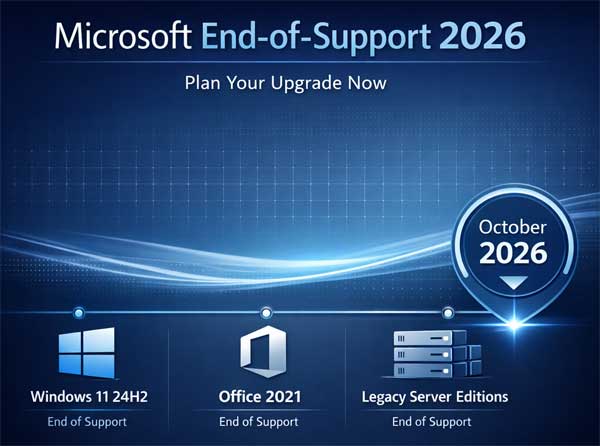
Microsoft has officially outlined its next major end-of-support cycle, and 2026 is shaping up to be a pivotal year for both consumers and businesses. Several widely used products such as Windows 11’s latest feature update and Office 2021will reach the end of their lifecycle, signaling the need for proactive upgrade planning.
Windows 11 24H2 Nears Its Final Chapter
The Windows 11 24H2 update, which introduced performance improvements and AI-driven features, will stop receiving updates in October 2026. After this date, devices running 24H2 will no longer receive security patches or bug fixes, leaving them vulnerable to exploits.
For users and IT teams, this means:
- Upgrade to newer releases: Microsoft will continue rolling out annual feature updates, so moving to the latest version ensures ongoing support.
- Security compliance: Unsupported systems pose significant risks, especially in enterprise environments where compliance standards require up-to-date software.
Office 2021: The End of an Era for Perpetual Licenses
Office 2021, the last major perpetual-license version of Microsoft’s productivity suite, will also hit its end-of-support milestone in October 2026. While many users adopted Office 2021 to avoid subscriptions, the clock is ticking.
What’s Next for Office Users?
- Transition to Microsoft 365: The subscription model offers continuous updates and cloud integration.
- Evaluate alternatives: Businesses that prefer one-time purchases may need to explore future standalone releases or third-party solutions.
Other Products in the Sunset Zone
This wave isn’t limited to Windows and Office. Microsoft’s lifecycle roadmap includes:
- Server editions: Older versions of Windows Server will phase out.
- Developer tools: Certain Visual Studio releases will lose support.
- Enterprise services: Legacy components tied to on-premises infrastructure will be retired.
Why This Matters
End-of-support isn’t just about losing new features, it’s about security. Unsupported software becomes a prime target for cyberattacks, and businesses risk compliance violations if they fail to upgrade.
Key Takeaways
- Start planning now: Don’t wait until 2026. Begin migration strategies early.
- Budget for upgrades: Factor in licensing costs and potential hardware requirements.
- Leverage cloud solutions: Microsoft is pushing toward cloud-first strategies, making Microsoft 365 and Azure integral to future-proofing.
Final Thoughts
Microsoft’s 2026 end-of-support wave underscores a broader trend: the shift toward continuous updates and subscription-based services. Whether you’re an individual user or managing enterprise IT, staying ahead of these deadlines is critical to maintaining security, compliance, and productivity.
For additional training resources, check out our online IT training courses.
Check out our extensive IT book series.