Last Updated on May 5, 2026
If you work in an environment that has a Microsoft Active Directory Directory domain, you are responsible for daily user account management. You know exactly how often you have to do things such as unlock user accounts or reset passwords for people who cannot seem to remember them. You may also have the need to make changes such as forcing a user to change their password at their next login or set an account to expire on a certain date for a contractor.
CJWDEV is a software company that makes a bunch of great Active Directory tools as well as other utilities such as a software auditing program and a NTFS permissions reporter tool. One of their Active Directory tools is called Account Rest Tool and allows you to connect to your AD environment from the program and perform tasks such as resetting passwords, unlocking accounts as well as enabling and disabling accounts.
Of course you can do the exact same tasks from the standard Active Directory Users and Computers utility. That method requires you to log into your domain controller or have the heavy Windows server management tools installed on your workstation. This is definitely not a wise choice for novice admins or helpdesk workers where you do not want them to be able to do anything else but manage user accounts.
Configuring the Account Reset Tool
1. Install the Software
All you need to do is install the Account Reset Tool directly on the local admin computer. The installation process is incredibly fast and requires virtually no system resources. You can deploy this to your entire helpdesk team within minutes.
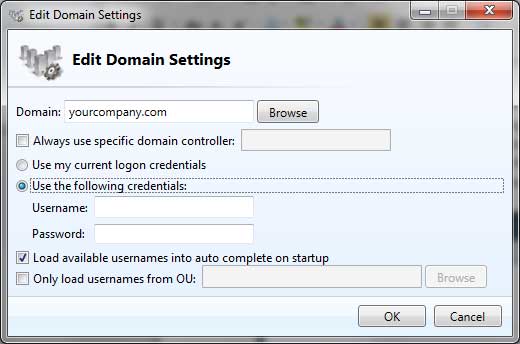
2. Enter Domain Credentials
You must put in the proper administrative credentials that have the correct rights to change domain user accounts. The tool relies on these specific permissions to communicate with your server safely. Standard users cannot abuse this tool without those exact administrative passwords.
3. Target Specific Domain Controllers
You can even have the software query a specific domain controller each time it is used. You can also configure the settings to only load users from a particular OU (Organizational Unit). This keeps your helpdesk staff restricted to only managing the specific departments they are assigned to.
Managing User Accounts
1. Select the Target User
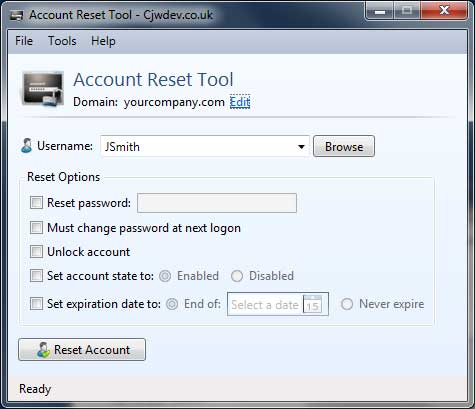
Once the software is configured it is very easy to use for daily tasks. Anyone with basic domain or user account administration experience will figure it out immediately. All you need to do is select the specific user account you want to change from the dropdown menu.
2. Check the Reset Options
Then you edit the sections you need to modify for that specific employee. You can type in a temporary password or check the unlock account box. You can also force the user to change their password at the next logon to maintain strict security compliance.
3. Execute the Account Reset
Review your selected checkboxes to ensure you are applying the correct changes. Click on the Reset Account button at the bottom of the window. The tool instantly sends the command to your server and you are completely done with the ticket.
Advanced Tool Features
1. Import the Group Policy ADM File
The Account Reset Tool also comes with a dedicated Group Policy ADM file. You can import this file directly into your domain Group Policy Management console. This file loads configuration settings into the tool for the users automatically.
2. Restrict Admin Capabilities
This group policy integration allows you to control exactly what your junior admins can and cannot do with the tool. You can lock down specific features to prevent accidental domain changes. It provides an excellent layer of security for large IT departments.
3. Download the Legacy Application
CJWDEV stopped officially updating their website several years ago. The Account Reset Tool is now considered a legacy application but it still works flawlessly on modern Windows Server environments. You can easily find the free download hosted on popular IT software archives like MajorGeeks or even the the CJWDEV website to try it out for yourself.
For additional training resources, check out our online IT training courses.
Check out our extensive IT book series.