Last Updated on May 17, 2020
When it comes to hard drives for your computer, you have a few choices as to what type of drive to use. Some offer better performance than others but that usually comes with a higher price tag. For example SCSI hard drives offer very high performance speed and are good for RAID array setups but they can be very expensive for a drive that is not that large in size.
Many people working on legacy systems or upgrading older machines eventually run into the classic debate of Serial ATA (SATA) hard drives versus IDE. SATA completely replaced the IDE standard years ago because it offered much faster speeds at around the exact same price point. What exactly is the core difference between SATA and older IDE drives?
1. Understanding the SATA Interface
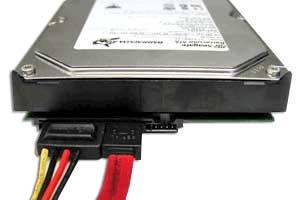
Serial ATA drives use a modern serial link and a single cable with a minimum of four wires to create a dedicated point-to-point connection between devices. The thinner serial cables allow far more efficient airflow inside the computer case and also allow manufacturers to build much smaller case designs. Every single SATA drive connects directly to its own port on the motherboard without having to share bandwidth with another device.
2. Exploring the Legacy IDE Interface
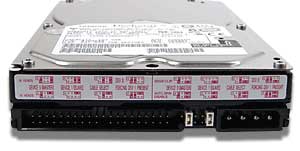
IDE (Integrated Drive Electronics) drives are also commonly called ATA or PATA. They are based on the ancient IBM PC Industry Standard Architecture and were the primary storage method in PCs for over a decade. They utilize a bulky controller built right into the motherboard and connect to other IDE devices using a massive 40 or 80 conductor flat ribbon cable.
3. Raw Performance and Data Speeds
SATA drives are drastically faster than IDE across the board. You will instantly see a massive difference when transferring large files or booting up a heavy operating system. IDE drives completely max out at a theoretical limit of 133 MBps due to their aging parallel architecture. SATA was capable of 150 MBps on its very first generation and easily pushes 6 Gbps on the newer SATA 3 revisions found in most modern computers.
4. Physical Installation Differences
Installing a SATA drive is structurally similar to installing an IDE drive, but the physical connections are vastly different. The data cable that connects to the motherboard is much narrower, and the power connection utilizes a modern L-shaped connector rather than the classic 4-pin Molex type. One major thing to watch for if you are a legacy Windows user is that you might need to manually configure Master and Slave jumper pins on the back of an IDE drive to get the computer to recognize it.
5. Hot Swapping Capabilities
One major technological advantage that pushed SATA ahead of IDE was the native introduction of hot swapping. You can physically plug or unplug a SATA hard drive while the computer is completely powered on and the operating system will recognize it instantly. Attempting to unplug a running IDE drive would instantly crash the entire machine and potentially corrupt the hard drive sectors beyond repair.
6. Storage Capacity and Pricing
Finding a brand new IDE drive today is almost impossible, making them surprisingly expensive collector items for retro computing enthusiasts. IDE drives peaked at around 750 gigabytes before the technology was entirely abandoned by hardware manufacturers. Modern SATA drives are incredibly cheap to manufacture and easily hold massive capacities exceeding 20 terabytes of data for a fraction of the cost.
7. The Modern Shift to NVMe Technology
While SATA completely dominated the storage market after killing off IDE, it is no longer the fastest drive interface available today. Brand new computers now heavily utilize NVMe M.2 drives that plug directly into the motherboard without any cables at all. These NVMe drives push speeds exceeding 7,000 MBps, making even the fastest SATA drives look incredibly slow by comparison. SATA remains the absolute best budget option for massive secondary storage arrays.
For additional training resources, check out our online IT training courses.
Check out our extensive IT book series.